
Web scraping is the process of fetching useful data from a website. It also plays an important role in data analysis and competitive analysis. With Python data scraping, you can automate data collection easily. To learn more about the language, visit the official Python website.
In machine learning, you need to prepare a dataset to train the model. Therefore, collecting the data is quite time-consuming. However, a Python library can scrape data from multiple websites and shorten the development process. As a result, extracting data is simple and saves developers a lot of time. Also, you can store the data in databases for future use and analysis. This helps data scientists especially, because they work with large and diverse datasets.
Web scraping also gives insight and growth to e-commerce platforms. It plays a vital role in helping businesses make better decisions. Further, it provides a market view based on patterns and trends in data.
In e-commerce, web scraping helps you gather information about multiple sellers. These sellers list their products in the same category, but at different prices, names and titles. If you need a tailored solution, see our custom software services.
Benefits of Using Python for Data Scraping
Libraries
Python is famous for its many libraries, which let you handle tasks in various fields. For data extraction from websites and APIs, Python has several libraries. These include BeautifulSoup, Selenium, requests, lxml and Scrapy. Python also offers libraries for data analysis, such as pandas and numpy. Together, they make Python data scraping quick.
Easy to use
Python needs no curly braces or semicolons, which makes the code easy to read and understand. As a result, you can scrape the web with a minimum of code and effort.
Code Debugging –
Python executes code one line at a time. This makes debugging easy and less complicated, because it stops the execution as soon as it finds an error in any line.
Environment Setup
A virtual environment is an isolated space that holds the packages a project needs. Python has a command to create one. This command makes a separate folder in the current working directory, and the project packages install there. Set it up first for any Python data scraping project.
Steps to create virtual environment on windows
Step 1: Create virtual environment using command:
python -m venv venv
Step 2: Activate virtual environment:
venv\Scripts\activate
Step 3: Install packages:
pip install package_name
Web Data Scraping with Python
Package Description
- Requests – The Requests library makes an HTTP request to any website with the GET method to get the information.
- BeautifulSoup – The BeautifulSoup library pulls data out of HTML by inspecting the website. It works with a parser to give you a way to search the parser tree.
- Pandas – Pandas is used for data analysis and data cleaning. It is the most common Python library in the field of data science. It offers various data structures and methods for data manipulation.
Steps and Code to Start Python Data Scraping
- First, create and activate the virtual environment with the commands above. Then install the packages you need for scraping.

- Next, create a Python file and write the code to scrape the website.
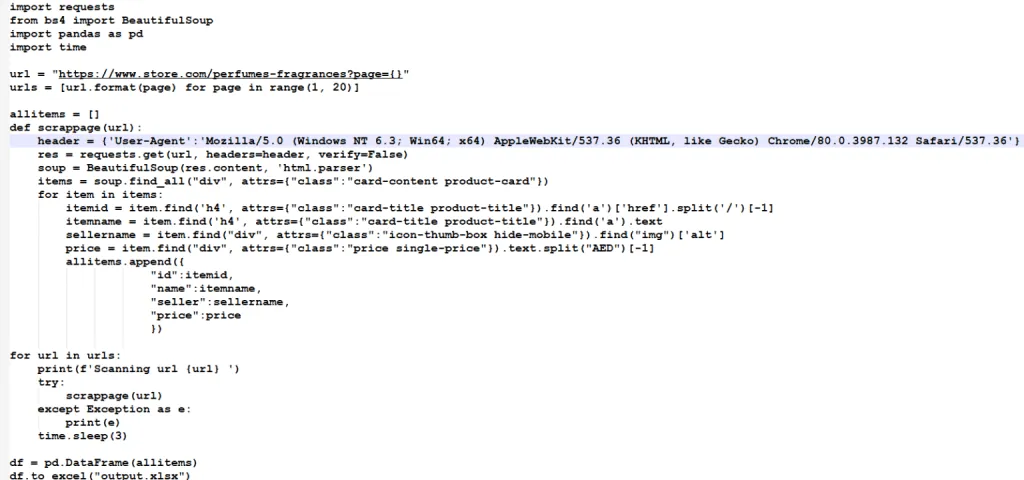
To sum up, there are many reasons to fetch data, and with Python you can automate the process easily. Python data scraping reduces development work, so it saves time and keeps the process simple. Keep reading for more tech knowledge like this.
Have a question about this?
Book a 30-minute call with an engineer who works on it.