
AWS is retiring EC2 Classic support in the AWS Classic Load Balancer, so it is time to plan. Today everybody wants to launch their business as soon as possible to hit the market on time. This requires technology with more flexibility and features. It should also be easy to maintain and scale as the user base grows. That is why we prefer cloud services, where a feature-rich cloud platform gives you all the components to deploy your IT product or service.
Amazon Web Services (AWS) is one of the cloud services market leaders, and it keeps adding and improving its services. As AWS adds new services, it also discontinues some services or launches an updated version of the same. A few months back, AWS decided to discontinue the EC2 Classic support of its AWS Classic Load Balancer. In this article, you will learn why.
In March 2006 Amazon launched its cloud services that we all know as AWS. It started with only one type of instance, i.e. m1.small, one region, us-west, and one type of flat network, i.e. the EC2 Classic network. After the launch of the first version, AWS kept on adding new services. However, user demands and new technologies also required AWS to deprecate some legacy services. Examples are the AWS server migration service and, recently, the Classic Load Balancer (CLB) in AWS Elastic Load Balancer on 15 August 2022.
Why Is the AWS Classic Load Balancer Discontinued?
Before we explore better options to replace the Classic Load Balancer, let’s first understand what the discontinuation of CLB means here. AWS is discontinuing the Classic Load Balancer with EC2 Classic, not the whole classic load balancer service.
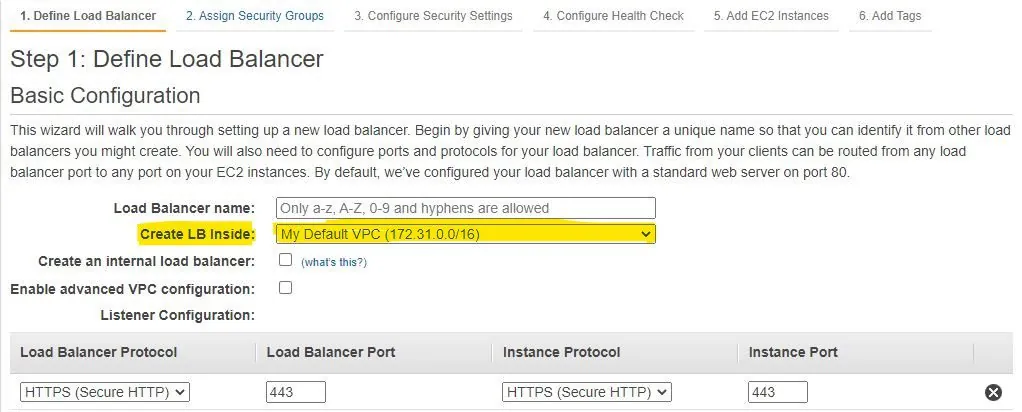
In simple terms, when you launch the CLB you will not get the option to use EC2 Classic instances. Instead, you will get the option to select a VPC.
How to Migrate Your AWS Classic Load Balancer
Before we discuss the migration options, let’s list the steps to follow. These steps make sure the new system is completely up and running. Then it can serve your whole user base and all features without surprise issues. We can follow the steps below for a safer migration –
- First, set up a new load balancer by following one of the migration options.
- Then, start redirecting the traffic gradually to the new load balancer.
- Next, create all the required roles and policies. Also make the necessary code updates in your application or deployment scripts, e.g. CI/CD tools.
- Finally, once it works fine with 70% of the traffic routed to it, we can delete the old load balancer, i.e. the CLB.
Migration Options for the AWS Classic Load Balancer
- Using the migration wizard in the AWS console.
- Using the load balancer copy utility from GitHub.
- Migrating manually to an Application or Network Load Balancer.
- Migrating manually to a Classic Load Balancer with VPC.
After seeing these four options, you might think that many articles online already describe them in detail. Yes, you are right. The value I want to bring here is different. Every option has certain challenges. Some options, for example options 1 and 2, are not as straightforward as the fancy words wizard and utility suggest.
The main concern is that the CLB must be in the VPC. I still see the steps not defined clearly. They assume a solution before they solve the problem. They also do not explain how to migrate from EC2 Classic to ALB or NLB directly. Instead, they expect you to migrate to ALB or NLB after you have already migrated your EC2 Classic to a VPC.
But what about that first step, i.e. EC2 Classic to VPC? What is the recommended way to do it, and how do you handle its challenges? To address the main challenge, I first list the blockers we need to consider –
- Migrating EC2 Classic to a VPC instance.
- What if we have both application and network layer rules in our CLB, i.e. HTTP/HTTPS and TCP? The migration wizard to ALB only considers HTTP/HTTPS, and to NLB it only considers TCP.
Now Let’s Discuss Both of Them in Detail
1. Migrating EC2 Classic to a VPC Instance
- Create a new VPC with at least two subnets in it. Create the subnets in the availability zone where you want your new EC2 resource to distribute the load by ELB.
- Create a new security group and copy the rules from your existing security group to the new one.
- Create an AMI of the old EC2 Classic resources and launch new resources using these AMIs. Make sure to attach the new instance to the same VPC we created in step 1.
- Assign the security group and subnet created previously to the new instance.
- Create a new Classic Load Balancer by selecting the VPC from step 1. Also select one subnet from each availability zone that contains the instance you plan to register with the new VPC CLB.
- Register the new instances with the new CLB. Make sure to add tags, if any, from the previous EC2 Classic CLB.
- Update your DNS record. If your DNS server supports a weighted feature to route the requests, like Route53, we recommend a gradual load transfer. For example, first transfer only 10% of the traffic to the new LB, then 50%, then 100%.
2. Handle Both HTTP and TCP Listeners/Rules
Once you are done with this, you can move your existing VPC CLB to ALB or NLB. You can use the migration wizard, the GitHub copy utility, or a manual migration. However, we face another challenge here: how to route the rules if the CLB contains both HTTP and TCP-based rules. None of the next-generation AWS load balancers supports both.
ALB supports HTTP and NLB supports TCP rules. Because of this, we need to change our applications. To migrate to ALB, they must listen over HTTP APIs instead of TCP sockets. To migrate to NLB, we must convert the APIs to TCP sockets. The choice depends on the type of your application. If it uses more REST APIs, we prefer ALB.
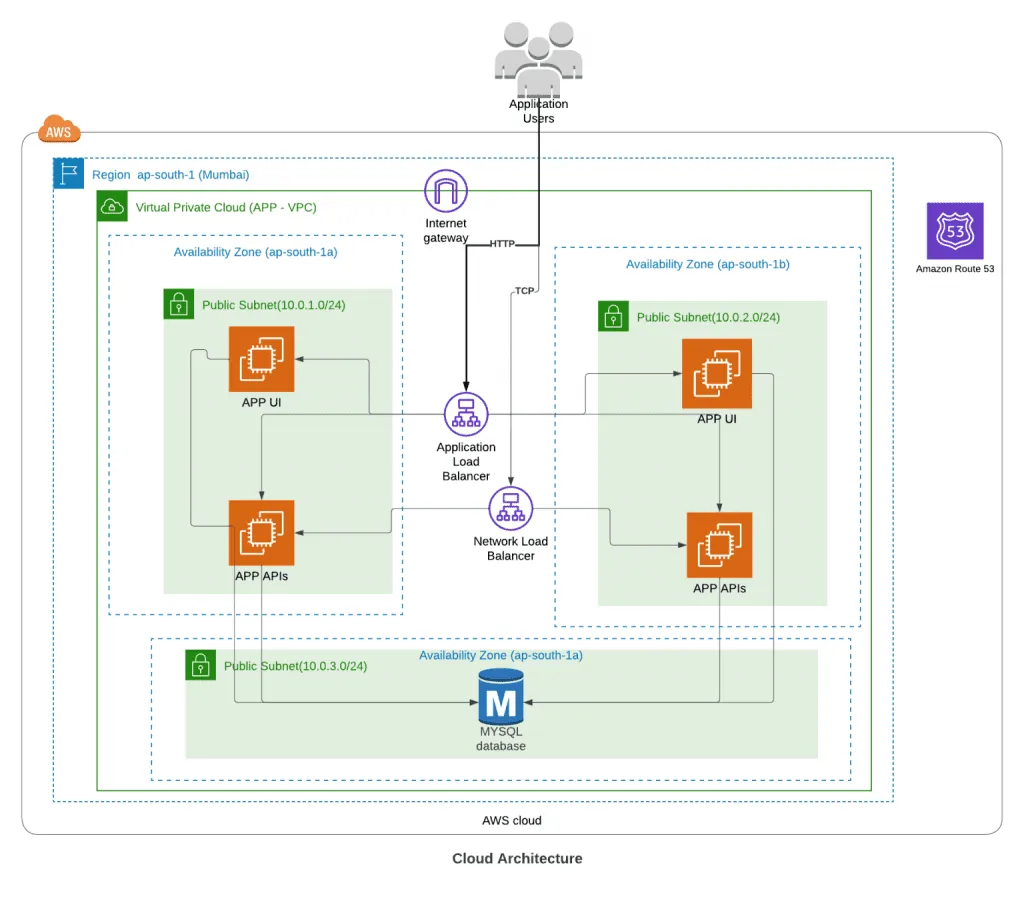
Another way is a hybrid approach. Here you register different subdomains for TCP rules and use NLB to route TCP-based requests. You can register the same set of instances behind both NLB and ALB, so you can use the same instance even with a hybrid approach. The image below gives an overview of this explanation.
Conclusion
In this article, rather than describing the actual steps of migration, I tried to make it simpler. I rearranged the steps and completed the flow from the EC2 Classic CLB to a VPC CLB. Then I took it further to the ALB or NLB. Depending on your application or deployment, another way may be more feasible.
The main concept here might give you a way forward for your migration challenge. The article does not fully describe the migration with the wizard or the Git utility. However, if you find a good resource covering the migration, please share the URL in the comment section.
If you have any questions, connect with me by writing in the comments. I will be happy to help. You can also read about the services on the AWS site, or contact our team for cloud help.
Have a question about this?
Book a 30-minute call with an engineer who works on it.