
In this guide, we deploy multilingual embedding model BAAI/bge-m3 on AWS EC2. The model creates embeddings for chat responses. It aligns paragraph embeddings, so the replies fit the context and stay coherent. People know BAAI/bge-m3 for its efficiency and accuracy. Also, it works within a 500-word limit, so responses stay short and focused. You can find the model on Hugging Face at – https://huggingface.co/BAAI/bge-m3
For the best performance, we recommend an EC2 instance with a GPU on AWS. A GPU is a special chip that handles many tasks in parallel. Machine learning and deep learning work, like this embedding model, needs that. As a result, a GPU server gives much faster response times than a CPU server. You can run the model on a CPU server. However, replies will take much longer because there is no hardware acceleration.
Moreover, this solution uses FASTAPI and Docker. FASTAPI is a modern web framework for building APIs with Python. It is fast and easy to connect with other tools and services. With FASTAPI, developers can quickly create endpoints to deploy the embedding model. Then they can plug it into existing systems or apps. Additionally, a Docker container packs the model, so deployment and management stay simple. It also works the same way in different environments. Need help with such a setup? See our AI integration services.
Step by Step Procedure to Deploy Multilingual Embedding Model on EC2
Prerequisites
Ubuntu OS
Hardware requirements:
-
1 x NVIDIA T4 GPU with 16 GB GPU memory
-
8 vCPU
-
32 GB RAM
-
Disk space – 100GB
Deploy Multilingual Embedding Model Server
1. Set Up AWS Infrastructure to Deploy Multilingual Embedding Model
First, open the EC2 service on Amazon Web Services (AWS) and click on launch instance.
2. Select the Right AMI Image
Next, choose a name for your instance and pick the Ubuntu AMI. Then, under Ubuntu, select the Deep Learning AMI GPU PyTorch 2.0.1 (Ubuntu 20.04) 20230926 image, which already includes Ubuntu, Nvidia drivers, Cuda and PyTorch.
3. Configure Your Instance Type
Then select the g4dn.2xlarge instance type for the best performance.
4. Deploy Multilingual Embedding Model on Your EC2
After that, click the “Launch Instance” button to start your EC2 instance.
5. Login into Putty server
To log in to the Putty server, you need these details:
- Server IP: [insert server IP here]
- Auto-login username: [insert auto-login username here]
- Key for login to server: [insert key for login to server here]
6. Check NVIDIA Configuration
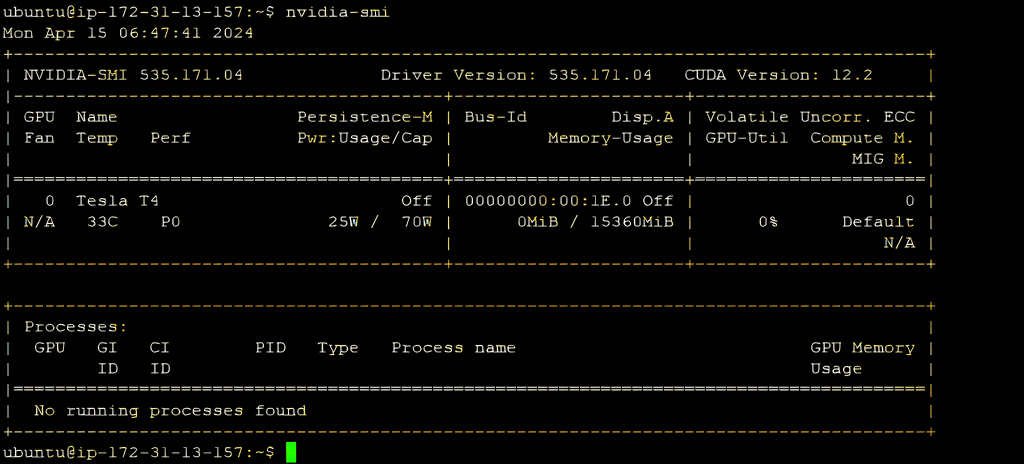
Next, check that the GPU is set up well by running the command nvidia-smi.
7. Manually Install FlagEmbedding
Now prepare your environment for the model. Install FlagEmbedding with this command
“pip install -U FlagEmbedding”
8. Prepare Python File to Deploy Multilingual Embedding Model
Then create a Python file with the code to talk to the BAAI/bge-m3 embedding model. For example, it imports the libraries and defines the text for embedding generation.
					from FlagEmbedding import BGEM3FlagModel
model = BGEM3FlagModel(‘BAAI/bge-m3’, use_fp16=True)
# Setting use_fp16 to True speeds up computation with a slight performance degradation
text = “What is BGE M3?”
embedding = model.encode(text, batch_size=12, max_length=524,)[‘dense_vecs’]
# If you don’t need such a long length, you can set a smaller value to speed up the encoding process.
print(embedding.tolist())
9. Run the Python File
Finally, run the code with the command python3 your_file_name.py to generate embeddings.
In conclusion, you can reach the multilingual embedding model through a REST API. To do this, set up an endpoint that takes text in the request body. Next, a Dockerfile makes deployment simple. You build an image and launch a container on the server. As a result, Docker removes the need for separate installations and makes it easier to scale. Finally, this approach makes chat-based apps work better.
Planning an AI project?
Our engineers build AI agents and run them in our own company first.