In this guide, we deploy chat completion model Mistral-7B-Instruct-v0.2 on AWS EC2. First, the model writes replies from a given context and question. It is also known for strong natural language processing. You can find it on Hugging Face at – https://huggingface.co/mistralai/Mistral-7B-Instruct-v0.2.
We run the model on a dedicated g4dn.2xlarge GPU server on Amazon Web Services (AWS). As a result, it performs well and scales easily. Also, this hardware handles many requests in parallel, so replies come fast and fit into existing chat platforms.
The main goal of the model is to give users accurate replies that fit the context. Because the output has a limit of 500 words, answers stay short but useful. As a result, the conversation stays smooth.
The model makes chat simpler across many platforms and apps. For example, you can use it in customer support systems, virtual assistants or social media messaging. In each case, it gives timely and relevant replies, so both users and businesses gain. If you want help with such a setup, see our AI integration services.
Step by Step Procedure to Deploy Chat Completion Model on EC2
Prerequisites
Ubuntu OS
Hardware requirements:
- 1 x NVIDIA T4 GPU with 16 GB GPU memory
- 8 vCPU
- 32 GB RAM
- Disk space – 150GB
Deploy Chat Completion Model Server
1. Set Up AWS Infrastructure to Deploy Chat Completion Model
First, open the EC2 service on Amazon Web Services (AWS) and click on launch instance.
2. Select the Right AMI Image
Next, choose a name for your instance and pick the Ubuntu AMI. Then, under Ubuntu, select the Deep Learning AMI GPU PyTorch 2.0.1 (Ubuntu 20.04) 20230926 image, which already includes Ubuntu, Nvidia drivers, Cuda and PyTorch.
3. Configure Your Instance Type
Then select the g4dn.2xlarge instance type for the best performance.
4. Deploy Chat Completion Model on Your EC2
After that, click the “Launch Instance” button to start your EC2 instance.
5. Login into Putty server
To log in to the Putty server, you need these details:
- Server IP: [insert server IP here]
- Auto-login username: [insert auto-login username here]
- Key for login to server: [insert key for login to server here]
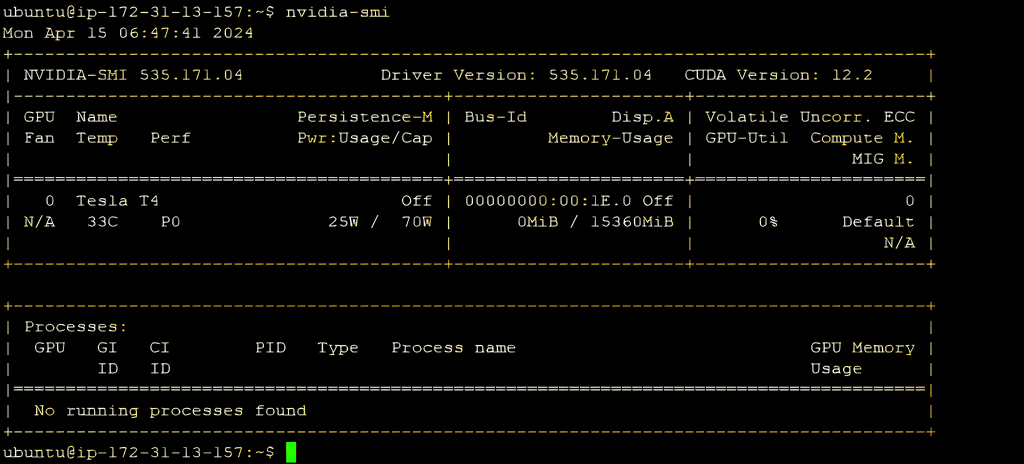
6. Check NVIDIA Configuration
Next, check that the GPU is set up well by running the command nvidia-smi.
7. Manually Install requirements
Now install the packages that the chat completion model needs. For this, use this command –
“pip install git+https://github.com/huggingface/transformers torch bitsandbytes accelerate”
8. Prepare Python File to Deploy Chat Completion Model
Then create a Python file with the code to talk to Mistral 7B. For example, it imports the libraries and defines the messages for the conversation.
					from transformers import AutoModelForCausalLM, AutoTokenizer, BitsAndBytesConfig
import torch
device = “cuda” # the device to load the model onto
quantization_config = BitsAndBytesConfig(load_in_4bit=True,
   bnb_4bit_quant_type=“nf4”,
   bnb_4bit_compute_dtype=torch.float16,
           )
model = AutoModelForCausalLM.from_pretrained(“mistralai/Mistral-7B-Instruct-v0.1”,quantization_config=quantization_config, device_map=“auto”)
tokenizer = AutoTokenizer.from_pretrained(“mistralai/Mistral-7B-Instruct-v0.1”)
messages = [
{“role”: “user”, “content”: “What is your favourite condiment?”}
]
encodeds = tokenizer.apply_chat_template(messages, return_tensors=“pt”)
model_inputs = encodeds.to(device)
model.to(device)
generated_ids = model.generate(model_inputs, max_new_tokens=500,   do_sample=True,pad_token_id=tokenizer.eos_token_id,eos_token_id=tokenizer.eos_token_id)
decoded = tokenizer.batch_decode(generated_ids)
print(decoded[0])
9. Run the Python File and Deploy Chat Completion Model
Finally, run the code with the command python3 your_file_name.py to get a response.
In conclusion, you can reach the chat completion model through a REST API. To do this, set up an endpoint that takes text in the request body. Next, a Dockerfile makes deployment simple. You build an image and launch a container on the server. As a result, Docker removes the need for separate installations and makes it easier to scale. Finally, this approach makes chat-based apps work better.
Planning an AI project?
Our engineers build AI agents and run them in our own company first.