
GraphQL serves as a language for asking questions to APIs and as a tool for getting answers from existing data. It’s like a translator that helps your application talk to databases and other systems. In this guide, you will learn GraphQL with FastAPI step by step. When you use GraphQL, you’re like a detective asking for specific clues – you only get what you ask for. For help with a custom API, see our web development services.
Why Choose GraphQL with FastAPI?
GraphQL fixes some common problems we face with traditional ways of getting data (like REST APIs). Here’s why:
- Get Exactly What You Need: No more getting extra info you don’t want or missing out on stuff you do.
- Flexible Requests: You can ask for different things in one go, saving time and making things simpler.
- Easy Development: Imagine having just one stop for all your data needs – that’s GraphQL! It’s like a super organized library where everything has its place.
- Clear Rules: GraphQL sets clear rules between your app and the servers, making sure everyone understands each other perfectly.
- Better Performance: By sending only what’s necessary, GraphQL makes your app faster, especially on phones or slow connections.
Database Connectivity with GraphQL
GraphQL makes it easy to connect to databases and perform operations. Here we use MySQL storage, and SQLAlchemy helps integrate seamlessly.
Enhancing GraphQL with Strawberry
Next, Strawberry adds extra functionality to GraphQL functions, including queries, types, fields, and mutations. It also supports file uploads within queries.
Exploring GraphQL with FastAPI: A Practical Guide to begin with
Installing GraphQL with FastAPI and Setting Up the Database
To use GraphQL with FastAPI, follow these steps:
- Installation: First, install the necessary packages using this command: pip install strawberry-GraphQL uvicorn fastapi mysql-connector-python SQLAlchemy.
- Database Setup: Then connect to the database so you can run operations. In this example, we use MySQL for storage, and SQLAlchemy connects to the MySQL database as ORM. For this setup, you create a database.py file to manage the connection. You also create a models.py file that defines the table columns for the database.
database.py
					from sqlalchemy import create_engine
from sqlalchemy.ext.declarative import declarative_base
from sqlalchemy.orm import sessionmaker
DB_USER = graphql_query_user
DB_HOST = 'localhost'
DB_PORT = '3306'
DB_NAME = 'user_data' #Enter the database name
DB_PASSWORD = '*****'
# MySQL connection URL
SQLALCHEMY_DATABASE_URL =
 f"mysql+pymysql://{DB_USER}:{DB_PASSWORD}@{DB_HOST}/{DB_NAME}"
engine = create_engine(SQLALCHEMY_DATABASE_URL)
SessionLocal = sessionmaker(autocommit=False, autoflush=False, bind=engine)
Base = declarative_base()
models.py
					from database import Base
from sqlalchemy import Column, Integer, String
from database import engine
class User(Base):
    __tablename__ = "users"
    id = Column(Integer, primary_key=True, index=True)
    firstName = Column(String(255))
    lastName = Column(String(255))
    age = Column(Integer)
    gender = Column(String(10))
    email = Column(String(255))
    phone = Column(String(20))
    username = Column(String(255))
    password = Column(String(255))
# Create the tables in the database
Base.metadata.create_all(bind=engine)
Defining Schemas
Defining Schemas: Once you connect to the database, define the schema for the User in a schemas.py file. This schema outlines the structure of the User data that GraphQL handles.
schemas.py
					import strawberry
@strawberry.type
class UserType:
    id: int
    firstName: str
    lastName: str
    age: int
    gender: str
    email: str
    phone: str
    username: str
    password: str
@strawberry.type
class DeleteUserResponse:
    success: bool
    message: str
CRUD Operations
CRUD Operations: Next, implement the CRUD (Create, Read, Update, Delete) operations in a crud.py file. First, define functions to handle operations such as fetching all users, retrieving a user by their ID, updating, deleting, and creating users. Then, group these operations under the Query and Mutation types in GraphQL.
crud.py
					from models import User
import strawberry
from strawberry.extensions import FieldExtension
from typing import List, Any, Callable
from database import SessionLocal
from schemas import UserType, DeleteUserResponse
@strawberry.type
class Query:
    @strawberry.field
    async def users(limit: int = 10, offset: int = 0) -> List[UserType]:
        db = SessionLocal()
        users = db.query(User).offset(offset).limit(limit).all()
        db.close()
        return users
    @strawberry.field
    async def user_by_id(id: int) -> UserType:
        db = SessionLocal()
        user = db.query(User).filter(User.id == id).first()
        db.close()
        return user
Query Functions
- The Query class, adorned with @strawberry.type, encompasses two GraphQL query functions responsible for fetching user data from the database.
- For example, the users function retrieves user details from the database, allowing optional parameters limit and offset to specify the number of users returned and the starting index respectively. When you run it, it opens a session with the database. Then it queries for users with the specified limit and offset, closes the session, and returns the fetched users as a list of UserType.
- Likewise, the user_by_id function retrieves user details based on the provided id, opening a session with the database, querying for a user with the matching id, closing the session, and returning the user details corresponding to the provided id as a single UserType. As a result, these functions enable efficient data retrieval, catering to scenarios such as fetching all users or accessing details of a specific user by their ID.
					@strawberry.type
class Mutation:
    @strawberry.mutation
    async def create_user(firstName: str, lastName: str, age: int, gender: str, email: str, phone: str, username: str, password: str) -> UserType:
        db = SessionLocal()
        new_user = User(firstName=firstName, lastName=lastName, age=age, gender=gender, email=email, phone=phone, username=username, password=password)
        db.add(new_user)
        db.commit()
        db.refresh(new_user)
        db.close()
        return new_user
    @strawberry.mutation
    async def update_user(id: int, firstName: str, lastName: str, age: int, gender: str, email: str, phone: str, username: str, password: str) -> UserType:
        db = SessionLocal()
        user = db.query(User).filter(User.id == id).first()
        if user:
            user.firstName = firstName
            user.lastName = lastName
            user.age = age
            user.gender = gender
            user.email = email
            user.phone = phone
            user.username = username
            user.password = password
            db.commit()
            db.refresh(user)
        db.close()
        return user
    @strawberry.mutation
    async def delete_user(id: int) -> DeleteUserResponse:
        db = SessionLocal()
        user = db.query(User).filter(User.id == id).first()
        if user:
            db.delete(user)
            db.commit()
            db.close()
            return DeleteUserResponse(success=True, message=f"User with ID {id} deleted successfully.")
        else:
            db.close()
            return DeleteUserResponse(success=False, message=f"User with ID {id} not found.")
Mutation Functions
The Mutation class, decorated with @strawberry.type, defines three GraphQL mutation functions to create, update, and delete user data in the database.
- The create_user mutation function asynchronously creates a new user with the provided parameters – first name, last name, age, gender, email, phone, username, and password. First, it connects to the database. Then it adds the new user, commits the transaction, and refreshes the database to reflect changes. Finally, it closes the session before returning the newly created user.
- The update_user mutation function also updates an existing user’s details based on the provided id and other parameters. First, it queries the database for the user with the matching id, and if found, updates the user’s attributes with the new values. Then it commits the changes, refreshes the database, closes the session, and returns the updated user. If no user with the provided id is found, it returns None.
- Finally, the delete_user mutation function deletes a user from the database based on the provided id. First, it queries the database for the user with the specified id. If the user exists, then it deletes the user, commits the transaction, and returns a success message along with a boolean indicating successful deletion. If no user is found with the provided id, it returns a failure message stating that the user was not found. Finally, it closes the database session before returning the response. Overall, these mutation functions provide essential functionalities for managing user data within the application.
GraphQL Schema Definition with FastAPI
Schema Definition: Then define the schema using Strawberry, specifying the mutations and queries that correspond to the CRUD operations implemented in the crud.py file.
schema = strawberry.Schema(query=Query,mutation=Mutation)
FastAPI Endpoint Creation
6. FastAPI Endpoint Creation: Create a FastAPI endpoint at “/graphql” to handle GraphQL mutations. Use add_route to integrate the GraphQL functionality provided by Strawberry into your FastAPI application.
main.py
					from fastapi import FastAPI
from strawberry.asgi import GraphQL
from crud import schema
app = FastAPI()
graphql_app = GraphQL(schema)
# Add GraphQL routes to FastAPI app
app.add_route("/graphql", graphql_app)
Running GraphQL with FastAPI
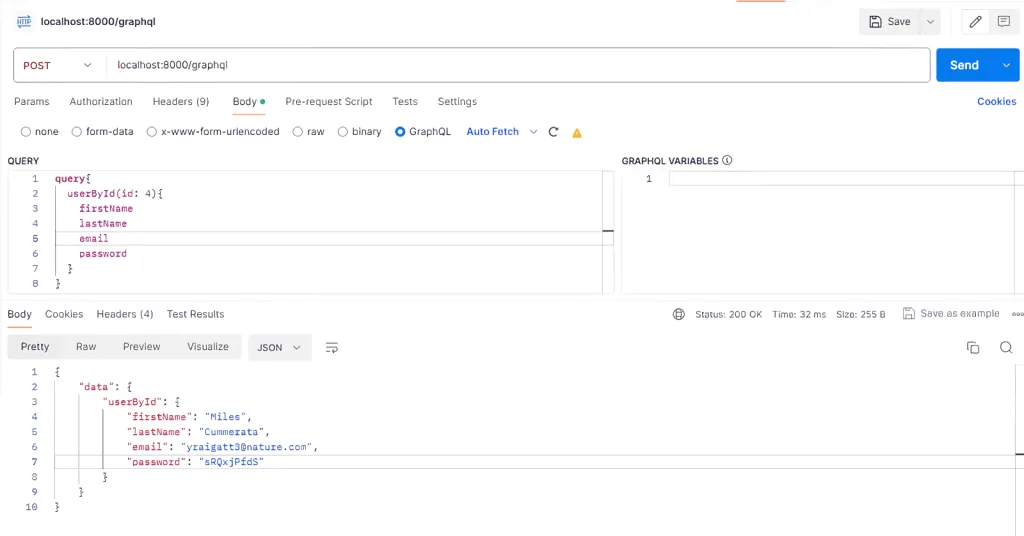
7. Running the Application: Run the command uvicorn main:app –reload to start the application. After that, open it at http://localhost:8000/GraphQL. Then you can run queries directly within the GraphQL body in Postman.
Query to Execute:
					# Query to get user by id
query{
  userById(id: 1){
    firstName
    lastName
    email
    password
  }
}
# Query to get users details
query{
  users{
    id
    firstName
    lastName
    email
  }
}
# Query to create user
mutation {
  createUser(
    firstName: "John"
    lastName: "Doe"
    age: 30
    gender: "Male"
    email: "john.doe@example.com"
    phone: "1234567890"
    username: "johndoe"
    password: "password123"
  ) {
    id
    firstName
    lastName
    age
    gender
    email
    phone
    username
  }
}
# Query to delete user
mutation {
  deleteUser(id: 23) {
   success
   message
  }
}
# Query to update user details
mutation {
  updateUser(
    id: 21
    firstName: "John"
    lastName: "Doe"
    age: 30
    gender: "Male"
    email: "john.doe@example.com"
    phone: "1234567890"
    username: "johndoe"
    password: "password123"
  ) {
    id
    firstName
    lastName
    age
    gender
    email
    phone
    username
  }
}
Finally, here’s a screenshot from Postman showing the testing of fetching a user by their ID using GraphQL
File Upload with GraphQL and FastAPI
- First, install the required packages using this command – pip install strawberry-GraphQL uvicorn fastapi python-multipart
- Next, create a function that accepts a file as input and reads it. This function, named read_file, processes the uploaded file. using Strawberry, specifying the mutation. Also, override the default scalar for file uploads to utilize the provided Upload scalar.
crud.py
					from sqlalchemy.orm import Session
import strawberry
from typing import List, Union, Any, Callable
from strawberry.file_uploads import Upload
from starlette.datastructures import UploadFile
@strawberry.type
class Mutation:
    @strawberry.mutation
    async def read_file(self, file: Upload) -> str:
        return (await file.read()).decode("utf-8")
schema = strawberry.Schema(query=Query,mutation=Mutation, scalar_overrides={UploadFile: Upload})
Then create a FastAPI endpoint at “/GraphQL” to handle GraphQL mutations. Use add_route to integrate the GraphQL functionality provided by Strawberry into your FastAPI application.
main.py
					from fastapi import FastAPI
from strawberry.asgi import GraphQL
from crud import schema
app = FastAPI()
GraphQL_app = GraphQL(schema)
# Add GraphQL routes to FastAPI app
app.add_route("/GraphQL", GraphQL_app)
- Then execute the command uvicorn main:app –reload to run the application. After running, access it at http://localhost:8000/GraphQL.
You can also make API calls using Postman.
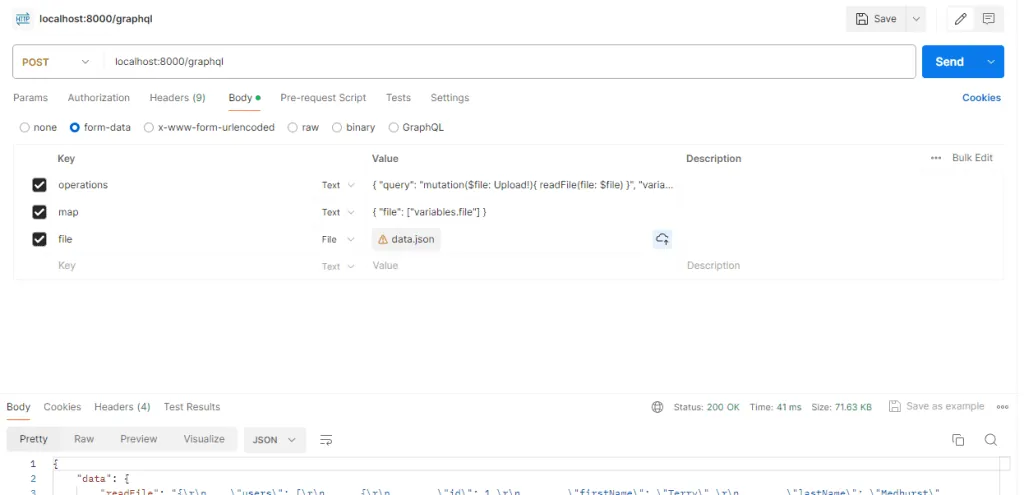
To upload a file using Postman, follow these steps:
- First, set up the request as a POST request to the GraphQL endpoint.
- Then, in the request body, select “form-data”.
- Finally, add the following key-value pairs in the form-data:
1. Key: operations
Value:
{
“query”: “mutation($file: Upload!){ readFile(file: $file) }”,
“variables”: { “file”: null }
}
2. Key: map
Value:
{ “file”: [“variables.file”] }
3. Key: file
Value: Select the file you want to upload using the file selector.
As a result, this setup lets you upload a file via the file parameter.
Here’s a screenshot from Postman showing the testing of reading file data by upload a file using GraphQL.
In conclusion, GraphQL makes CRUD operations easier by putting them all in one place through queries and mutations. As a result, developers build APIs more easily and clients get exactly the data they need, so apps run faster. However, GraphQL faces challenges like query complexity, where really deep queries can slow down servers. Also, caching and setting limits on requests can be tricky, which affects how well servers run.
Need a website or web app?
We build on WordPress, Webflow, Shopify, Bubble and custom stacks.