
Yes, you read it right: you can build a responsive website with Odoo in just 20 minutes, using the Odoo website builder. It helps you create a beautiful and stunning website in a minimal amount of time. Odoo has advanced features. It provides many snippets for multiple requirements, as well as social icons that are easy to use. So, are you ready to build a highly interactive website in a few clicks? Read on to learn more.
Build a Responsive Website With Odoo Website Builder
The Odoo website builder has a default website template called My Website. You can edit it as you need, or you can create your own website instead. To build a responsive website with Odoo, follow the steps below:
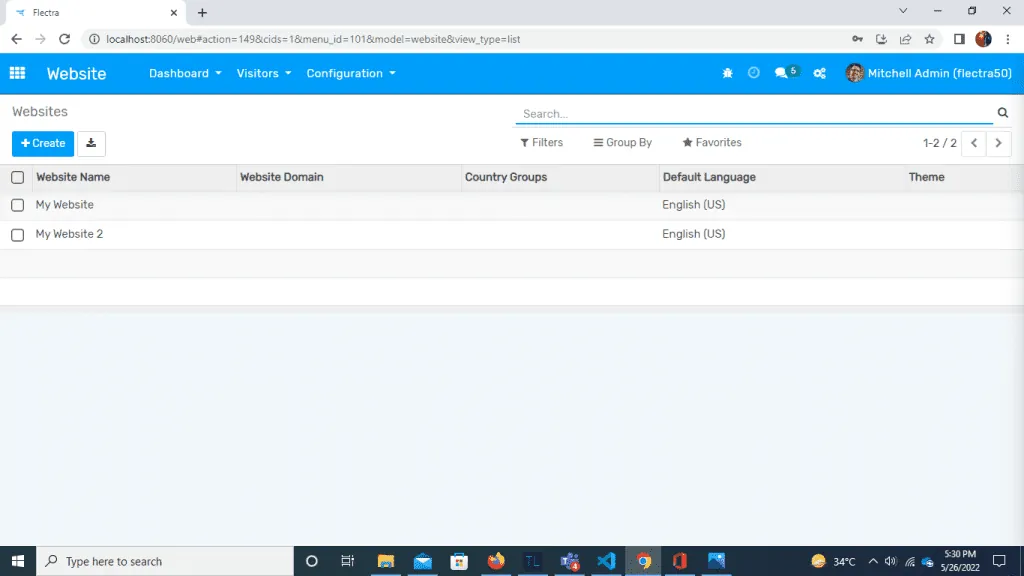
Go to website -> Configuration -> Websites -> Create
Choose the name and domain of your website. Then add a logo and the default language of the website.
Create the Header and Menus of Your Responsive Website With Odoo
Go to your website and click the edit option. Now you can create your website according to your layout. Click the header of the website. You will see various header templates with different functions and layouts. They differ in the position of the logo and menus, the types of buttons, social icons, and so on. Choose any template you need.
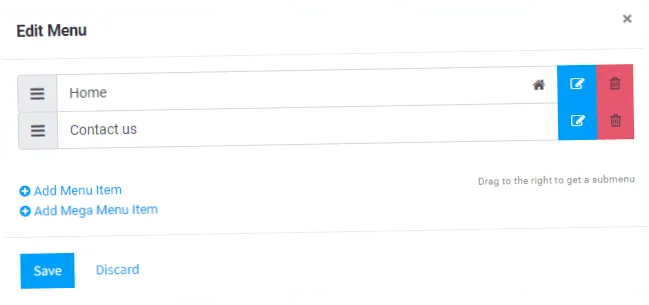
You can also edit menus and sub menus in the header. Click any menu, and a confirmation box appears. Then click the option to edit the menu. Here you can add menus and sub menus, set the sequence of menus, and set the URL of the page for each menu.
Create the Body of Your Responsive Website With Odoo
First, you can create body of a website by drag and drop of building blocks. Odoo website have multiple types of snippets to create a website , you can create your own snippet as per your requirement.
There are three options available by which you can manage layout of website.
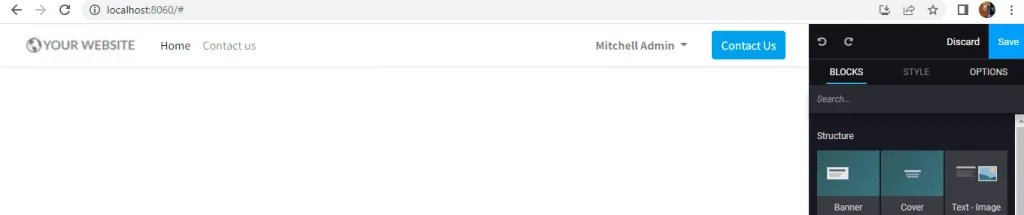
Blocks
There are different types of snippets available as per their layouts like you can choose cover block for cover image of website, If you want to create layout for text and image together then you can choose text image snippet, there are snippets for heading, text, numbers by which you can manage text content of website.
Many blocks are available to manage images of website, you can use image gallery or carousel for sliding multiple images, Columns block creates cards for images. If you want to show comparison between some products or anything else you can use Comparisons block. If you are creating a website for any restaurant or shop then you can use a price list block to define prices and categories of products. You can define quotes for your website by using a quotes block. Chart block can be used for creating a chart. Google Map block is also available, you can use it by API key.
These are some basic building blocks of Odoo website, there are many more blocks are available in Odoo website, also you can develop a new block as per your requirement. You can create a stunning website with full of media and functionalities by just drag and drop of building blocks.
Style
With this section, you can manage any particular block. You can set background color, height, width, position, no of columns. You can replace media and manage font size, font color etc. There are multiple options available according to specific blocks to manage the style of that block.
Options
With this section you can manage the style of the whole website like layout of page, font style of website, padding, border, button style etc.
Theme of the Website
Next, in the options section theme colors are available for the website. Theme color sets color of header, footer, buttons etc. There is a default theme color palette added for the website, you can set theme color website as per your choice.
Create the Footer of Your Responsive Website With Odoo
The default template of footer is available in Odoo for the website, you can edit it as per your layout or you can select a new template for your website. There are many templates available for footer based on position of logo, alignment of text, no of columns and buttons.
Odoo website provides many social icons like Facebook, Twitter, Instagram etc. You can use them in your website and make your website more interactive.
Language Selectors
Finally, Odoo website provides language selectors for the website you can enable or disable as per your need. Multiple languages can be added to your website in Odoo. You can use just a flag of language or you can use flag or text both.
Types of Websites You Can Build With Odoo Website Builder
Business websites
You can create websites for your business with the help of Odoo website builder. Business websites can be informational or eCommerce both.
Portfolios
Portfolio provides professional information about any individual company or it is a showcase of their work. You can create a portfolio of your company very easily with the help of Odoo.
Blogs
For example, you can write blogs with Odoo website. Odoo website contains multiple blocks for text, you can use them and create a fabulous blog.
ECommerce website
ECommerce website allows you to buy or sell any product online. You can develop ECommerce websites very easily with the help of Odoo. You just have to install ECommerce module in your Odoo instance.
This module provides shopping facilities, payment facility etc. You can add products to sell from front end only and also you can add description of product and can set price of product.
ECommerce module provides a cart for shopping and it generates bill automatically based on price and quantity. You can also track your order on the Odoo ECommerce website.
Event websites
Event website is created for any event by the event planner. Odoo website contains many blocks for images, text and animation, you can create a beautiful event website with Odoo and you can add interesting content for your audience.
Personal websites
These can be created by anybody for their personal use. Personal websites can contain resumes, bio, blog etc.
Informational websites
Informational websites represent the experience or work of any organization. It provides some detailed information about any company. It can contain the future goals of any organization.
Conclusion: Build a Responsive Website With Odoo
To sum up, you can build a responsive website with Odoo, and its no-code approach works like an automatic car. Anybody can drive it without learning the gears. Also, if you wish to update your website’s content more often Odoo website would be the best and quickest solution for you with reduced need of technical expertise.
Working on Odoo?
Talk to the engineers who build Odoo systems and apps every day.


