
SharePoint Framework and SPFx Web Parts
The SharePoint Framework (SPFx) is a web page and web part-based model. It offers complete support for client-side SharePoint development, clean integration with SharePoint records, and extending Microsoft Teams.
In this post, we learn how to make SPFx web parts with the SharePoint Framework and how to create our first SPFx web part. For other solutions, see our custom software service.
Setting Up the Environment for SPFx Web Parts
Install:
1.node js
2. Install any code editor that supports client-side development to create webpart: like Visual studio code
3. yeoman and gulp: npm install -g yo gulp
4. Yeoman SharePoint generator: – npm install -g @microsoft/generator-sharepoint
To get the node, gulp, and yeoman versions used: – npm list -g –depth=0

Create the First Web Part
Web parts are UI blocks that you can show on a SharePoint page.
Follow the steps below to create a new SPFx web part project.
- First, open the command prompt
- Create the folder where you want to create your webpart solution: md demoWebpart
- Enter in the folder: cd demoWebpart
Further, to create a new solution on the present location, use the following command in the terminal
yo @microsoft/sharepoint
After that, the generator asks for the following input:
- What is your solution name? (spfx-webpart): demowebpart
- Which type of client-side component to create?: webpart
- What is your Web part name?: demoWebpart
- Which template would you like to use: noframework
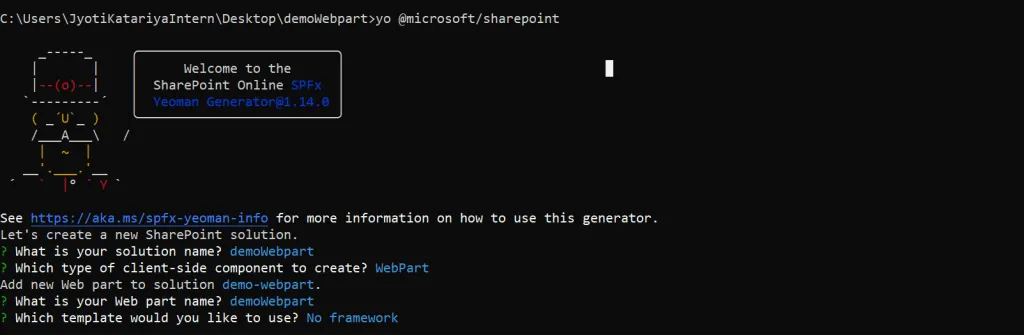
Following this procedure, the generator creates your demo web part. Then we can test the web part on a workbench after we create the solution.
Use gulp serve to test the web part on the workbench.
To deploy the build:
gulp bundle –ship
gulp package-solution –ship
Web Part Using the React Framework
React components offer many functions and can receive properties. Components can pass information to each other through properties. As a result, you can control which view of a web part displays at any given time.
For instance, you can build the multiple views individually to make programming and maintenance easier. This also makes it easy for a group of developers to work on the same web part at the same time. Splitting the views into independent React components also makes switching between them much easier.
Creating SPFx Web Parts Using the React Framework:
yo @microsoft/sharepoint
What is your solution name? (spfx-webpart): webpartWithReact
Which type of client-side component to create?: webpart
What is your Web part name?: webpartWithReact
Which template would you like to use: React
After this, the generator creates your web part.
The generator creates three files in src/webpart/component
WebpartWithReactProp.ts: in this, we declare the properties
WebpartWithReact.tsx: in this, we can use properties that are declared in WebpartWithReactProp.ts file
WebpartWithReact.module.scss: write the CSS
Therefore, SPFx web parts give web developers the tools to create an efficient and user-friendly solution.
Further, web parts can display lists and libraries, data from external data sources, and content from other sites.
To sum up, SPFx web parts are versatile and combine well, so they are a very powerful way to build content.
Have a question about this?
Book a 30-minute call with an engineer who works on it.