
Salesforce integration is the process of combining the information and functionality of Salesforce with other applications. The goal is to give users one unified experience. When we talk about integration, we mean linking a particular Salesforce instance with another database or system.
Salesforce integration connects salesforce.com with third-party external systems and applications like Facebook, Gmail, and Outlook. As a result, you can use the features of those applications with Salesforce. To read more about the platform, visit the official Salesforce site.
Why Do You Need Integration?
Basically, integration is a mechanism where two or more systems talk to each other. They send data to each other over the world wide web or an open network. This way, the systems act like one system, because the user interacts with only one system. The user still gets data from different sources.
Different Salesforce Integration Layers
Also, you can carry out Salesforce integration at different layers within your CRM platform.
- User Interface: This layer lets users enter multiple apps from a single platform. For example, we can integrate third-party applications like Facebook and LinkedIn with Salesforce. The user interface layer mainly focuses on user interactions with the system. In this layer, we identify the components to integrate third-party web applications into Salesforce.
- Business Logic: This layer uses Apex web services for inbound calls and Apex Callouts for outbound calls. They handle business logic across multiple applications. Apex web services let us write logic and expose it as a web service to third-party applications.
- Data Integration: This layer connects with the user interface and the business process. It helps keep application data consistent between multiple integrated systems. For example, you can use the SOAP API to synchronize data between systems accurately.
Salesforce Integration Process
App-based Salesforce integration: As the name implies, this approach uses specific applications. With only a few clicks, users of these apps can combine the data from two different apps into a single platform.
First, to combine your Salesforce CRM with other applications, you need a reliable integration platform. It should let data flow smoothly between the two applications. Popular third-party apps like Zapier and Dropbox make it easier to integrate with Salesforce.
Code-based Salesforce integration: You can also do Salesforce integration with a programming language, not only with specialized applications. The most typical example is the use of Apex. It is a proprietary programming language with a Java-like syntax.
Here are some benefits of Salesforce integration:
- Improve productivity
- Access data from different sources
- Make better decisions
- Automate workflows
- Modernize the data infrastructure
Platform and Tools
Salesforce integration tools let you share the valuable data you collect in Salesforce with other systems. This means everyone in your organization, including non-Salesforce users, can access the customer information when needed.
These are some of the popular Salesforce integration tools on the market:
- Rapidi Online
- Jitterbit
- MuleSoft
- Zapier
Rapidi Online: For Salesforce and Microsoft Dynamics data integration, Rapidi is a leader in the market. Rapidi integrates Salesforce with all Microsoft Dynamics ERPs (Microsoft Dynamics AX, GP, NAV, 365 Business Central, or 365 for Finance and Operations). However, you can also use it to integrate Salesforce with various other ERPs. The RapidiOnline tool uses pre-configured templates to simplify the integration with Microsoft Dynamics ERP. It also comes with out-of-the-box reports and dashboards. You can use them as they are or modify them easily to suit your needs.
Jitterbit and MuleSoft
Jitterbit: Jitterbit is a cloud-based, advanced point-to-point artificial intelligence software integration platform. It enables fast, easy, and secure data transfer between technologies. Also, it streamlines processes and delivers projects in days instead of months.
MuleSoft: This is an integration platform that helps businesses connect data, applications, and devices across on-premise and cloud computing environments. ESB stands for Enterprise Service Bus. An Enterprise Service Bus is an integration platform that allows developers to connect applications easily.
With MuleSoft, applications can exchange data. It also lets different applications communicate with each other. Its design works on the flow of incoming and outgoing messages. In addition, it uses different types of connectors for different types of requests, like HTTP, JMS, etc.
Zapier
Zapier: Zapier is a way for you to automate your business process. This tool provides a platform to integrate apps with Salesforce and connects with over 2000 different apps. These include many of the apps you work with, like Facebook lead ads, Slack, Gmail, and Google Sheets. Anyone can build app workflows with just a few clicks, because the tool is easy to use.
The primary goal of Zapier is to save users time and effort by quickly automating daily tasks in workflows known as Zaps. Connecting your apps and creating workflows tailored to your needs can improve productivity in all areas of work and life.
Key Concepts in Zapier
- Zap: A Zap is an automatic workflow that links your applications and services together. Each Zap is made up of one trigger and one or several actions.
- Apps: An app is a web service or apps like Google Docs, Slack, or Salesforce. Zapier provides integrations for over 3,000 apps, so you can move data between them.
- Trigger: Every Zap begins with a trigger that watches for new or updated data.
- Action: Actions are events that a Zap runs after the trigger fires.
- Filter: You can add filters to a Zap so that it runs only when specific requirements are met.
Salesforce Integration With Google Sheets via Zapier
Follow these steps to complete the Salesforce integration with Google Sheets using Zapier.
Connect Google Sheets
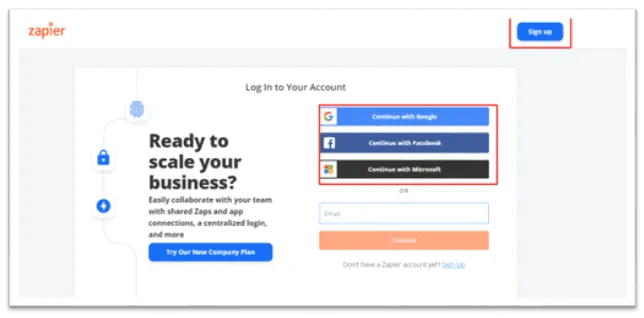
Step 1: First, create an account on Zapier if you do not have one.
Then, in step 2, type the app name you want to make a Zap connect in this app field, as shown in the figure below.
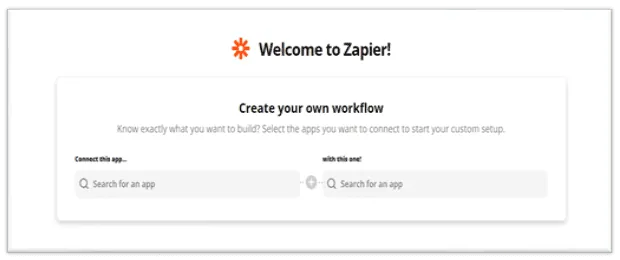
Step 3: Then type the name of the app you wish to connect with in this field.
- Select Salesforce
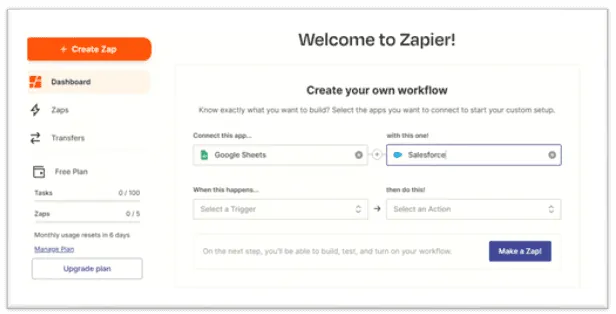
Next, in step 4, select the action you want to perform whenever the trigger happens and click Try it, as shown in the figure below.
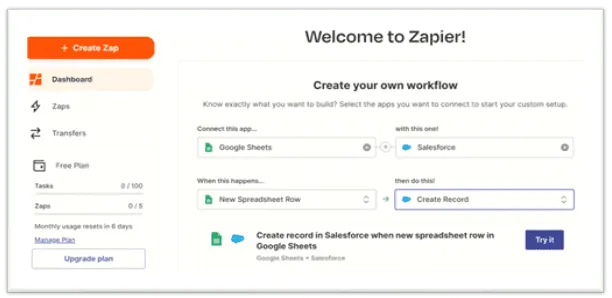
Step 5: Click on Get Started, as shown below.
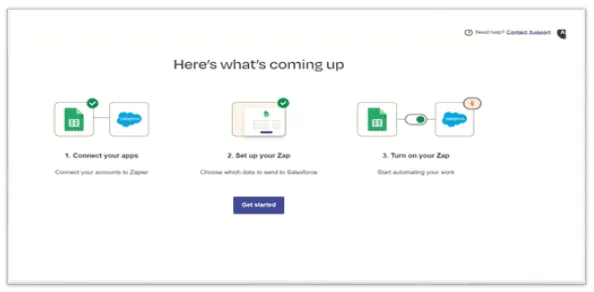
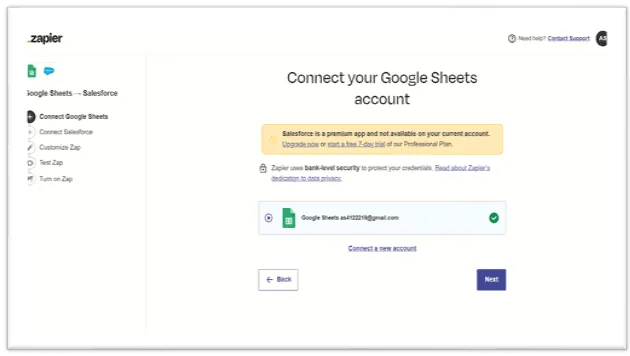
After that, in step 6, connect your Google Sheets account.
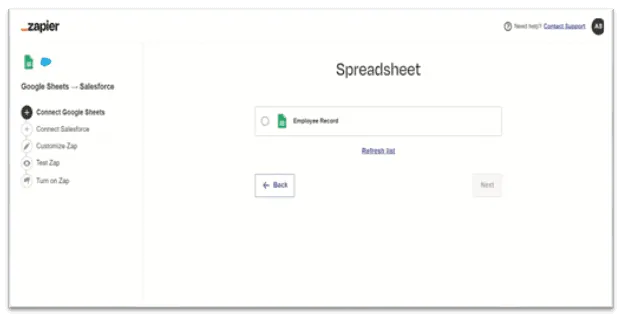
Step 7: Select the required Spreadsheet as shown in the below figure. Click Next.
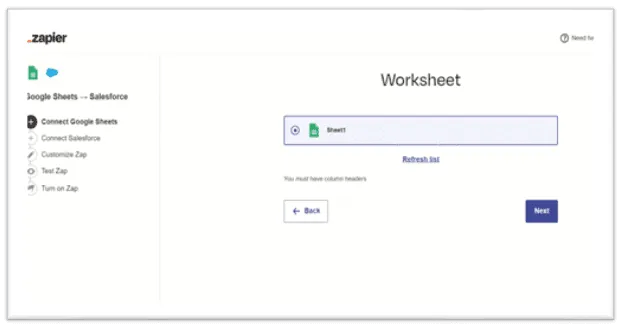
Likewise, in step 8, select the required worksheet as shown in the figure below. Click Next.
Connect Salesforce
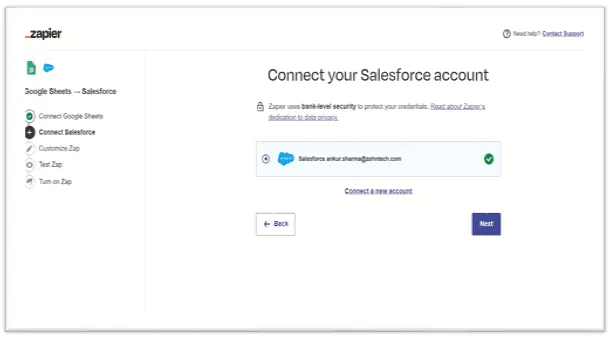
Step 9: Now connect your Salesforce account as shown below. Click Next.
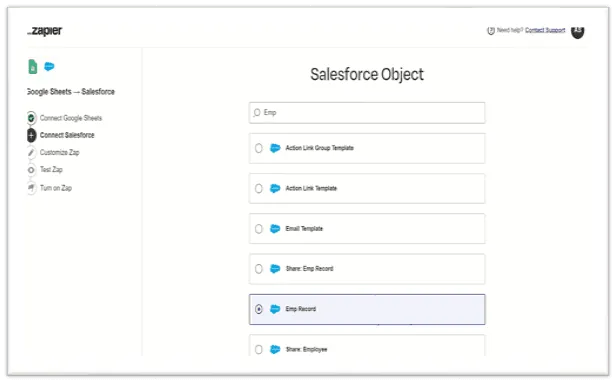
Then, in step 10, select the Salesforce object in which you need to create a new record. Here it is the Emp Record object. Click Next.
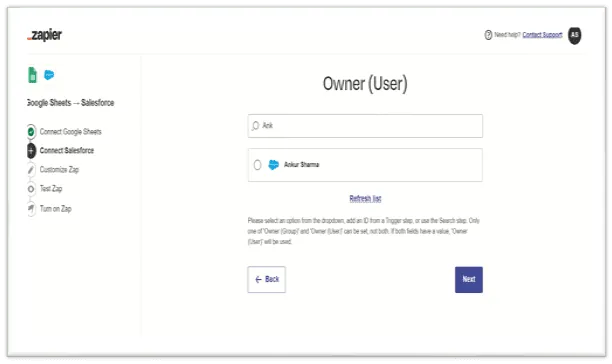
Step 11: Select the user, then click Next.
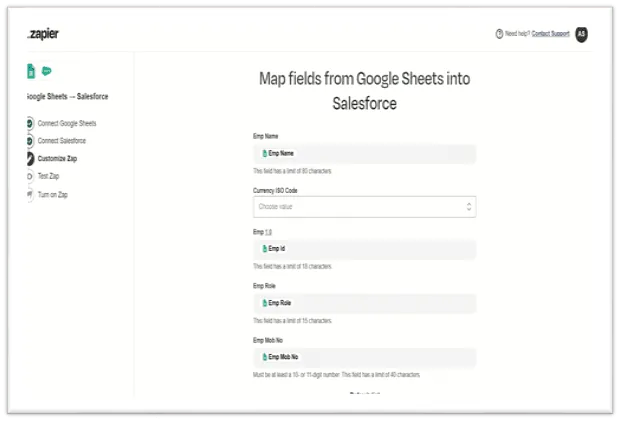
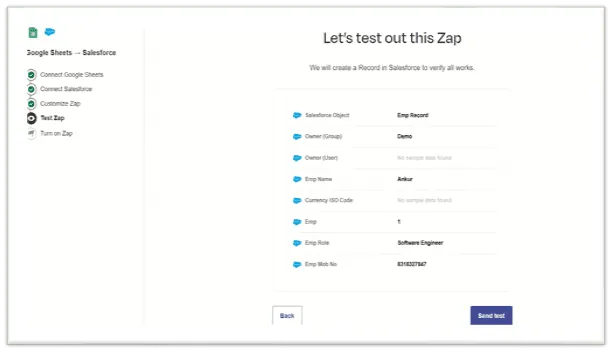
Next, in step 12, map the fields from Google Sheets into Salesforce, then click Next.
Step 13: Click on the Send test and check if the record is created in Salesforce.
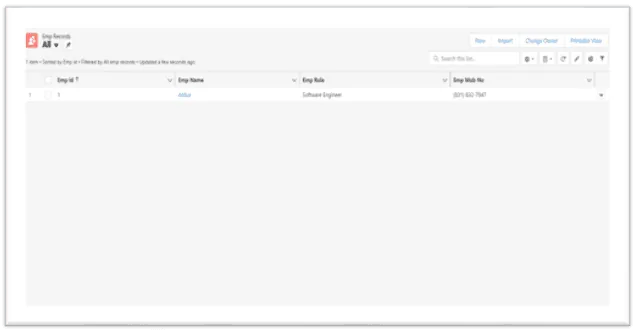
Finally, in step 14, check that the records are created in Salesforce, as shown below.
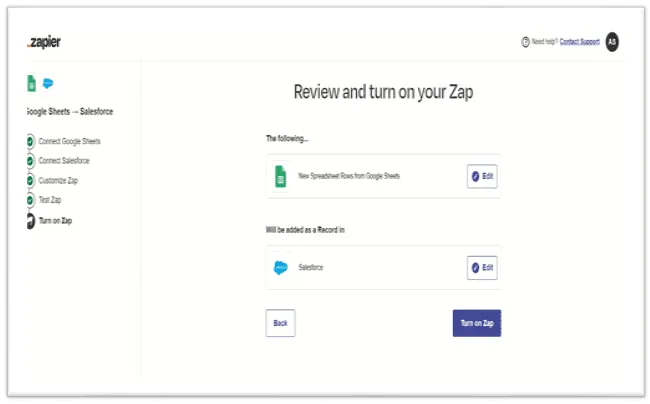
Step 15: Click Turn on Zap to activate it, as shown below.
Conclusion
Salesforce integration is about connecting Salesforce with other tools and systems. It connects complex systems and automates business processes seamlessly. When you integrate Salesforce with various third-party applications, you get benefits such as ease of use, better business decisions, stronger customer networks, and increased revenue.
Zapier acts as a binder between these applications by automatically transferring data from one application to another. In short, Salesforce integration lets these applications communicate and share data for better performance. If you want help with your own integration, see our integration services or contact us.
Have a question about this?
Book a 30-minute call with an engineer who works on it.