
Recently, Apache announced the Airflow 2.3.0 release. It follows Apache Airflow 2.2.0. This new release has over 700 commits, including 50 new features, 99 improvements, 85 bug fixes, and several doc changes.
Here is a glimpse of the major updates in the Airflow 2.3.0 release:
- Dynamic Task Mapping(AIP-42)
- Grid View Replaces Tree View
- Purge History From the Metadata Database
- LocalKubernetesExecutor
- DagProcessorManager as standalone process (AIP-43)
- JSON Serialization for Connections
- Airflow db downgrade and Offline Generation of SQL Scripts
- Reuse of Decorated Tasks
Let’s discuss these updates in detail.
Dynamic Task Mapping(AIP-42) in the Airflow 2.3.0 release
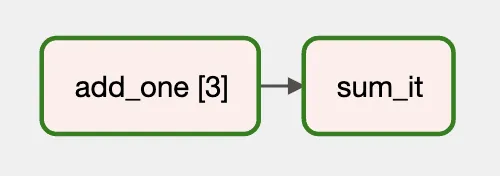
First, Dynamic Task Mapping lets the workflow create a number of tasks at runtime based on current data. As a result, the DAG author does not have to know in advance how many tasks are required.
This is similar to defining tasks in a for loop. However, the DAG file does not fetch the data itself. Instead, the scheduler uses the output of a previous task. Right before the mapped task runs, the scheduler creates n copies of the task, one for each input.
Next, you can also have a task work on the collected output of the mapped task. People commonly call this map and reduce.
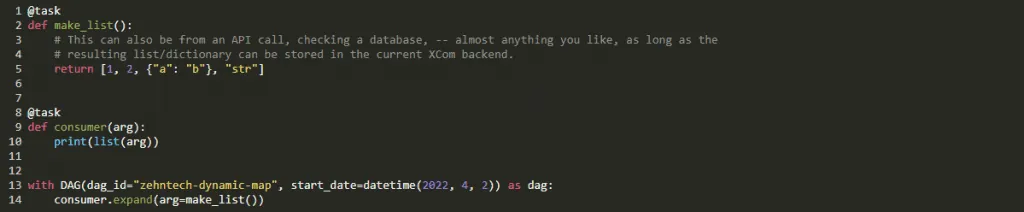
Airflow now fully supports dynamic tasks. This means Airflow can generate tasks at runtime. It works like a for loop, so you can make the same task without knowing the exact number of tasks ahead of time. For example, you can have a task that generates a list to iterate over.
For example, see below.
Grid View replaces Tree View
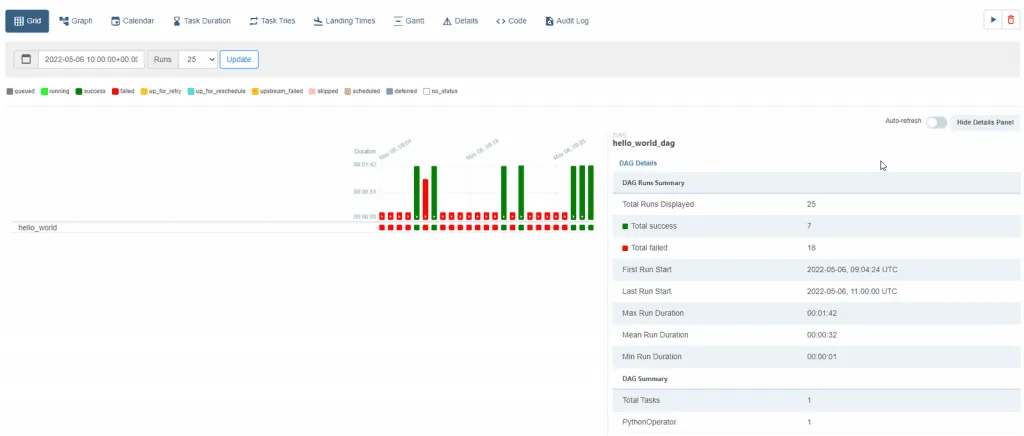
Then, the screenshot below shows how Grid view replaces Tree view in Airflow 2.3.0.
Purge history from the metadata database
The Airflow 2.3.0 release adds a new airflow db clean command. It removes old data from the metadata database.
Also, you can use this command to reduce the size of the metadata database.
Here is some more information: Purge history from metadata database
LocalKubernetesExecutor
Airflow 2.3.0 introduced a new executor named LocalKubernetesExecutor. It helps you run some tasks with the LocalExecutor. It also runs another set of tasks with the KubernetesExecutor in the same deployment, based on the task’s queue.
Here is some more information: LocalKubernetesExecutor
DagProcessorManager as standalone process (AIP-43)
In Airflow 2.3.0, the DagProcessorManager can be run as a standalone process. Because DagProcessorManager runs user code, it is better to separate it from the scheduler process. You can run it as an independent process on a different host.
In Airflow 2.3.0, the dag-processor CLI command starts a new process for the DagProcessorManager. First, you need to set the [scheduler] standalone_dag_processor to True.
Here is some more information: dag-processor CLI command
JSON Serialization for the Connections.
First, you can create connections by using the JSON serialization format.
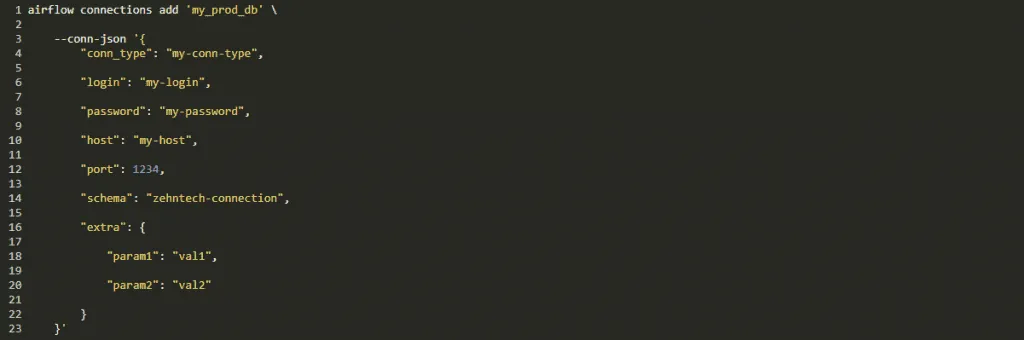
You can also use the JSON serialization format when you set connections in environment variables.
Here is some more information: JSON serialization for connections
Airflow DB downgrade and Offline generation of the SQL scripts
Airflow 2.3.0 adds a new command, airflow db downgrade. It downgrades the database to the version you choose.
You can also generate the downgrade or upgrade SQL scripts for your database. Then you can run them manually, or just view the SQL queries that the downgrade or upgrade command would run.
Here is some more information: Airflow DB downgrade and Offline generation of SQL scripts
Reuse of decorated tasks
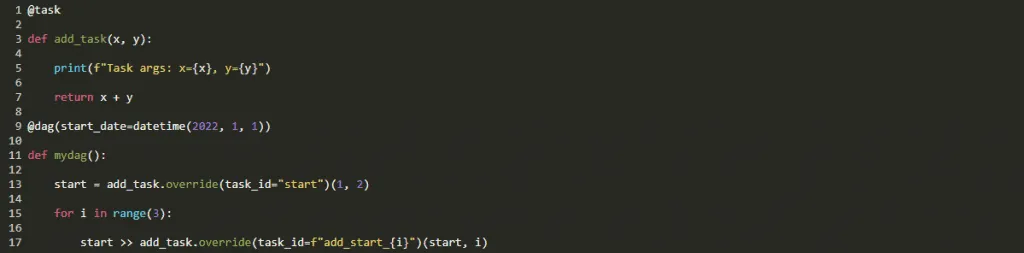
Finally, you can reuse decorated tasks across DAG files. A decorated task has an override method, so you can override its arguments.
Here’s an example:
Other small features in the Airflow 2.3.0 release
This is not a full list, but some interesting small features include:
- Support for different timeout values for DAG file analyzing.
- The airflow dags reserialize command to reserialize DAGs.
- The Events Timetable.
- SmoothOperator – the operator that does literally nothing except log a YouTube link to Sade’s “Smooth Operator”. Enjoy!
To learn more about our data and web work, see our web development services, or visit the official Apache Airflow site.
Planning an AI project?
Our engineers build AI agents and run them in our own company first.