Salesforce gives you an easy and quick way to create and manage content in one place. It also keeps multilingual content and version control. This post shows how to sync Salesforce with AWS PostgreSQL.
There are many reasons to sync Salesforce with an external database. For example, you may want a data warehouse, a changelog or a data backup. In each case, the external database must stay up to date on every create, read, update and delete (CRUD) operation in Salesforce. To achieve this, Salesforce provides built-in services such as Object Triggers.
In this article, we walk through a case study of a project. There we chose to sync Salesforce with an AWS PostgreSQL database, for reasons we explain below. You can also read about AWS services on the official site.
In this project, Salesforce is the backend and the admin panel of a mobile app. The app connects to Salesforce through REST APIs. Then it fetches its content from Salesforce.
A Quick Look at Salesforce REST APIs Before We Sync Salesforce with AWS PostgreSQL
To use Salesforce data in external systems or apps, Salesforce offers REST API integration. This integration makes it easy to manage the content on various platforms.
REST APIs are exposed with Connected App in Salesforce.
The Connected App will provide the client_id and client_secret. To authenticate users, you use them together with a Salesforce username and password.
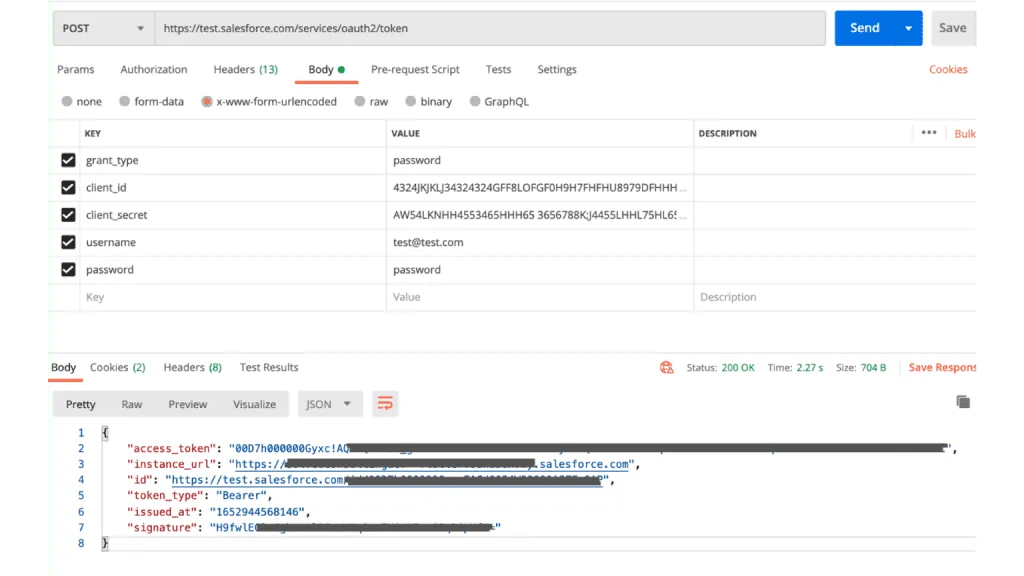
Salesforce Login API Example
We connected the mobile app with Salesforce by using Salesforce REST APIs. But as we grew, we moved from an MVP to a production-ready application. At that point we felt a need to remove the Salesforce API integration. We also needed a more robust, reliable, and secure solution, for the following reasons.
- First, we had to store crucial information in the mobile app sources. For example, the client id, the client secret and, most importantly, the Salesforce username and password. If someone gains access to these details, they can log in to Salesforce. They can also mess up the database, which affects every user of the app.
- Second, this is closely related to the first reason. As I mentioned, we store the login details in the mobile app sources. So if we change the Salesforce username or password, we must change them in the app too. This happens if the credentials are compromised, or if Salesforce asks for new credentials after 90 days. Then we have to push the app to the stores again. The app breaks for existing users unless they update to the latest version.
- Third, there is the REST API rate limit. Salesforce only allows 100,000 API calls (+ purchased API Call Add-Ons) in 24 hours. This is very low for a production-ready mobile app that targets hundreds of thousands of users.
- Finally, we sometimes saw downtime on Salesforce for various reasons. For example, scheduled maintenance or a billing issue with Salesforce. App downtime can make users lose trust in a tough market. So, it was not always a reliable solution.
Our Fix: Sync Salesforce with AWS PostgreSQL
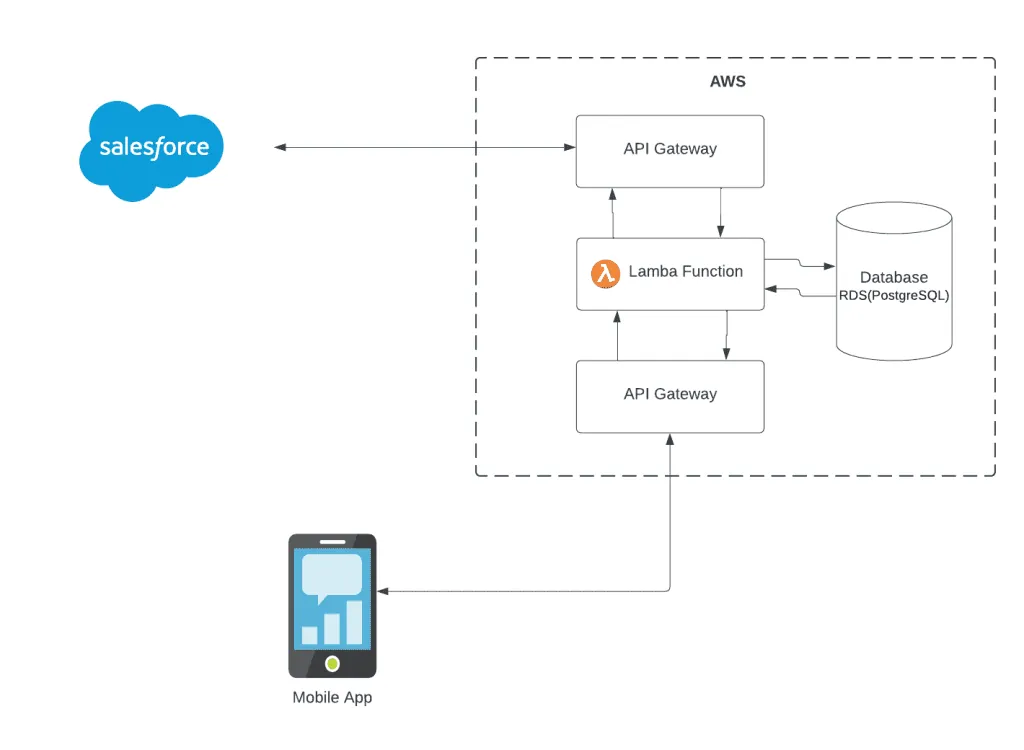
To overcome these challenges with the Salesforce REST APIs, we created a dedicated server with its own database. It works as a bridge between Salesforce and the mobile app. We removed the direct connection between the app and Salesforce and routed it via AWS.
Technology Stack to Sync Salesforce with AWS PostgreSQL
- API Gateway
- Lambda Function
- CloudWatch
- RDS (PostgreSQL)
We chose AWS services, such as Lambda and AWS RDS, over a custom backend application hosted on an EC2 instance. We did so for their high availability, durability, and easy maintenance. Also, we used a micro-service based architecture and created different micro-services for different functions.
Data Extraction Before You Sync Salesforce with AWS PostgreSQL
When the admin or app manager changes anything in Salesforce, AWS syncs the latest changes automatically. To achieve this, we used Object Triggers on Salesforce. Object triggers are events that fire on every change to the object records. For example, they fire when someone inserts a new record, deletes a record, or updates a record.
On every trigger, API Gateway receives the added, updated, or deleted record.
Transformation and Data Load
API Gateway gets the data from Salesforce and passes it to the Lambda function. The Lambda function holds the core business logic. It extracts the data from API Gateway requests and processes it for different tables. Then it performs the needed operations, such as insertion, deletion, and update.
We have dedicated Lambda functions for INSERT, DELETE and UPDATE operations. Each one processes the data and runs the operation on the PostgreSQL database.
Mobile App Connectivity After the Salesforce AWS PostgreSQL Sync
The mobile app now connects to the new dedicated server through API Gateway. Every time the app makes an HTTP request, API Gateway redirects it to the Lambda function. Then the Lambda function performs the data operation the request asks for. For example, if the app asks to fetch data, the Lambda function runs the queries on the PostgreSQL database and returns the response via API Gateway.
Because the app now gets its data from the dedicated server, it no longer needs to store Salesforce credentials. This resolves our first challenge. Also, changing the Salesforce credentials does not affect the app.
We have eliminated the Salesforce REST APIs. The app now talks to the dedicated server, so it does not matter how many users use the app. It will not run into the API rate limit.
That’s All!!
Now the AWS RDS (PostgreSQL) database holds a synchronized replica of the Salesforce data. If you are also facing similar challenges with Salesforce integrations and need assistance or advice then feel free to leave a comment below or get in touch with us at https://www.zehntech.com/contact-us/
Have a question about this?
Book a 30-minute call with an engineer who works on it.