
Here we fix SSH exception error problems in AWS IoT Secure Tunneling. SSH sets up a secure connection between two computers, one local and one remote. Most people use it for secure terminal access and file transfers. However, it can also build a secure tunnel between machines. That tunnel relays non-encrypted network connections. SSH tunnels can also give outside users access to internal network resources.
For example, while working on an IoT project for a client, I met a strange error. It was an SSHException that happened while I published data to an AWS IoT topic.
How I Fix SSH Exception Error While Publishing Data
I used the Boto3 IoT data plane service. Within this service, I used the publish function to send data to an AWS IoT topic.
Then I set the AWS access key, secret and region. I used the environment variables AWS_ACCESS_KEY_ID, AWS_SECRET_ACCESS_KEY and AWS_DEFAULT_REGION for this.
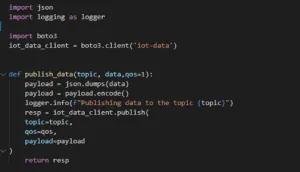
This code snippet is used to publish the data
The older version of Boto3, called Boto, had security turned off by default. So the code above may work well with Boto. However, if you upgrade Boto, security is on by default. Then the code gives you this error:
“botocore.exceptions.SSLError: SSL validation failed for https://data.iot.us-east-2.amazonaws.com/topics/{your_topic}”
You will find an online solution that sets the verify argument of the AWS IoT client to false. It looks like this:
iot_data_client = boto3.client(‘iot-data’,verify = False)
But as soon as you run it, you get warnings like this:
“Unverified HTTPS request is being made to host ‘data.iot.us-east-2.amazonaws.com’. Adding certificate verification is strongly advised.”
This is a security warning. It turns off certificate verification, so someone can quickly change your message in transit. Data also does not travel over HTTPS. Therefore, to fix SSH exception error problems like this one, you must go through the debugging process.
What exactly do you mean by the debugging process, and why is it important to go through software testing?
Debugging means finding and removing existing and possible errors in software code. Such errors can make the code behave in unexpected ways or crash.
When I debugged this SSH error, I looked for the difference. As a result, I learned about a condition for access to the AWS IoT data plane service. In my case, I tried to publish a message to an AWS topic. So I needed a root CA certificate from an AWS authorised CA. The detailed description is at this URL:
https://docs.aws.amazon.com/iot/latest/developerguide/server-authentication.html
The endpoint type section of that page explains the options. I downloaded the Verisign certificate. I sent data to data.iot.us-east2 instead of my own endpoint URL. My own URL comes from the AWS IoT Service Settings section. For this reason, our endpoint fell into the iot:data type, so I chose the Verisign option.
Otherwise, I could have used the Amazon Trust Services certificate. It fits the iot:data-atts type of endpoint.
Why I Preferred Amazon Trust Services Certificate?
- It removes the manual work of using and managing SSL/TLS certificates.
- It protects certified private keys with strong encryption and stores them safely.
- It renews certificates automatically, and
- It avoids downtime from wrongly set up, revoked or expired certificates.
Set the Certificate Path to Fix SSH Exception Error
Therefore, I downloaded the certificate from the Verisign certificate URL in the link above. Then I kept it in a file named verisign_class_3_public_cert.pem. After this, I set the absolute path of this file in the verify argument of the Boto3 client.
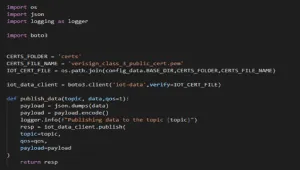
Refer to our code snippet to set an absolute path
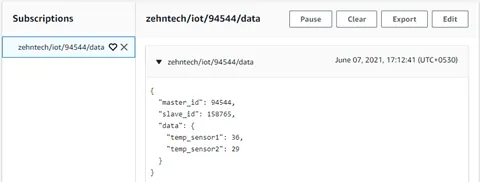
Finally, I ran the whole process step by step. I managed to publish a message on SSH to the AWS IoT topic, as you can see in the image below: –
Conclusion: Fix SSH Exception Error in AWS IoT
The AWS Secure Tunneling component lets you use AWS IoT Secure Tunneling for secure two-way communication. It works with Greengrass Core devices that sit behind restricted firewalls. Secure Tunneling uses MQTT over WebSockets to make these connections. It also has various data plane services that help you publish data to an AWS IoT topic. As a result, you can open SSH connections to the device through the tunnel that AWS IoT manages.
You can also reach AWS IoT through the AWS IoT Console. It gives you a graphical interface to manage things, certificates, rules, jobs, policies and other parts of your IoT solutions. If you need help with a project like this, see our custom software services.
Have a question about this?
Book a 30-minute call with an engineer who works on it.