
EBS snapshots play an important role when you back up your EC2 instances. This article covers EC2 snapshot management. We automate EBS volume snapshots with a Lambda function and CloudWatch Events for a daily backup. Then we delete the snapshots after a set time limit. You can also read about our custom software services.
Prerequisites for EC2 Snapshot Management
- AWS account
- IAM user in AWS account
- IAM user must have permission to access services for creating Lambda function.
- We need an IAM role to define what permissions our lambda function has.
- CloudWatch permission to create Rules.
Create the IAM Role for EC2 Snapshot Management
First, log in to the AWS console with the root account or with an IAM user who has permission to create roles.
- Click on Services and select IAM services.
- IAM services page will open from the left panel click on Create Role.
- Create Role page will open select lambda service(Because we need permission to access lambda function).
- On selecting lambda function it will invite you to attach permission and policies to the role. but we will create our customer policy.
Policy Permissions for the Snapshot Function
We want our function to be able to do the following:
- Read all type of information from EC2 (we will give it fully describe and read access)
- Create and Delete Snapshots
- Create and access Cloudwatch Event.
To create the above policy, use the visual editor or provide a JSON. You can use the JSON policy below.
{
        "Version": "2012-10-17",
        "Statement": [
            {
                "Effect": "Allow",
                "Action": "logs:*",
                "Resource": "*"
            },
            {
                "Effect": "Allow",
                "Action": "ec2:Describe*",
                "Resource": "*"
            },
            {
                "Effect": "Allow",
                "Action": [
                    "ec2:CreateSnapshot",
                    "ec2:DeleteSnapshot",
                    "ec2:CreateTags",
                    "ec2:DeleteTags",
                    "ec2:ModifySnapshotAttribute"
                ],
                "Resource": [
                    "*"
                ]
            }
        ]
    }
{
        "Version": "2012-10-17",
        "Statement": [
            {
                "Effect": "Allow",
                "Action": "logs:*",
                "Resource": "*"
            },
            {
                "Effect": "Allow",
                "Action": "ec2:Describe*",
                "Resource": "*"
            },
            {
                "Effect": "Allow",
                "Action": [
                    "ec2:CreateSnapshot",
                    "ec2:DeleteSnapshot",
                    "ec2:CreateTags",
                    "ec2:DeleteTags",
                    "ec2:ModifySnapshotAttribute"
                ],
                "Resource": [
                    "*"
                ]
            }
        ]
    }
{
        "Version": "2012-10-17",
        "Statement": [
            {
                "Effect": "Allow",
                "Action": "logs:*",
                "Resource": "*"
            },
            {
                "Effect": "Allow",
                "Action": "ec2:Describe*",
                "Resource": "*"
            },
            {
                "Effect": "Allow",
                "Action": [
                    "ec2:CreateSnapshot",
                    "ec2:DeleteSnapshot",
                    "ec2:CreateTags",
                    "ec2:DeleteTags",
                    "ec2:ModifySnapshotAttribute"
                ],
                "Resource": [
                    "*"
                ]
            }
        ]
    }
Tagging for EC2 Snapshot Management
The Lambda function uses EC2 instance tags to find the instances that need a snapshot.
- From EC2 Services select the EC2 instance for which we want to create a snapshot.
- From the Tags section, add the tag below.
- The name of the tag is “auto_snapshot” value for the tag is “true”.
- Save the changes by clicking the Save button.
Lambda Function to Create a Snapshot

Go to the AWS Lambda Management Console from Services.
- Click on Create function. A new page opens.
- Select Author from Scratch.
- Give a specific name for creating a lambda function in the Function name.
- Choose Python 3.6 as a runtime.
- For roles select Use an existing role and select the role we made earlier.
Code for EC2 Snapshot Management
I use Boto3. Boto3 is the SDK for Python. It provides programmatic connectivity to create, configure and manage AWS services with Python.
import boto3
import collections
import datetime
from pprint import pprint
ec = boto3.client('ec2')
def lambda_handler(event, context):
    reservations = ec.describe_instances(
        Filters=[
            {'Name': 'tag-key', 'Values': ['auto_snapshot', 'true']},
        ]
    ).get(
        'Reservations', []
    )
    instances = sum(
        [
            [i for i in r['Instances']]
            for r in reservations
        ], [])
    print("Found {0} instances that need backing up".format(len(instances)))
    to_tag = collections.defaultdict(list)
    for instance in instances:
        pprint(instance)
        try:
            retention_days = [
                int(t.get('Value')) for t in instance['Tags']
                if t['Key'] == 'Retention'][0]
        except IndexError:
            retention_days = 15
        for dev in instance['BlockDeviceMappings']:
            if dev.get('Ebs', None) is None:
                continue
            vol_id = dev['Ebs']['VolumeId']
            print("Found EBS volume {0} on instance {1}".format(
                vol_id, instance['InstanceId']))
            snap = ec.create_snapshot(
                VolumeId=vol_id,
            )
            to_tag[retention_days].append(snap['SnapshotId'])
            for tags in instance['Tags']:
                if tags["Key"] == 'Name':
                    instancename = tags["Value"]
            print("Retaining snapshot {0} of volume {1} from instance {2} for {3} days for {4}".format(
                snap['SnapshotId'],
                vol_id,
                instance['InstanceId'],
                retention_days,
                instancename
            ))
            delete_date = datetime.date.today() + datetime.timedelta(days=retention_days)
            delete_fmt = delete_date.strftime('%Y-%m-%d')
            print("Will delete {0} snapshots on {1}".format(len(to_tag[retention_days]), delete_fmt))
            print("instance id now ")
            ec.create_tags( Resources=[snap['SnapshotId']],Tags=[
                            {'Key': 'automatic-snapshot-delete-on', 'Value': delete_fmt},
                            {'Key': 'Name', 'Value': instancename},
                            {'Key': 'Instance ID', 'Value': instance['InstanceId']}
            ])
import boto3
import collections
import datetime
from pprint import pprint
ec = boto3.client('ec2')
def lambda_handler(event, context):
    reservations = ec.describe_instances(
        Filters=[
            {'Name': 'tag-key', 'Values': ['auto_snapshot', 'true']},
        ]
    ).get(
        'Reservations', []
    )
    instances = sum(
        [
            [i for i in r['Instances']]
            for r in reservations
        ], [])
    print("Found {0} instances that need backing up".format(len(instances)))
    to_tag = collections.defaultdict(list)
    for instance in instances:
        pprint(instance)
        try:
            retention_days = [
                int(t.get('Value')) for t in instance['Tags']
                if t['Key'] == 'Retention'][0]
        except IndexError:
            retention_days = 15
        for dev in instance['BlockDeviceMappings']:
            if dev.get('Ebs', None) is None:
                continue
            vol_id = dev['Ebs']['VolumeId']
            print("Found EBS volume {0} on instance {1}".format(
                vol_id, instance['InstanceId']))
            snap = ec.create_snapshot(
                VolumeId=vol_id,
            )
            to_tag[retention_days].append(snap['SnapshotId'])
            for tags in instance['Tags']:
                if tags["Key"] == 'Name':
                    instancename = tags["Value"]
            print("Retaining snapshot {0} of volume {1} from instance {2} for {3} days for {4}".format(
                snap['SnapshotId'],
                vol_id,
                instance['InstanceId'],
                retention_days,
                instancename
            ))
            delete_date = datetime.date.today() + datetime.timedelta(days=retention_days)
            delete_fmt = delete_date.strftime('%Y-%m-%d')
            print("Will delete {0} snapshots on {1}".format(len(to_tag[retention_days]), delete_fmt))
            print("instance id now ")
            ec.create_tags( Resources=[snap['SnapshotId']],Tags=[
                            {'Key': 'automatic-snapshot-delete-on', 'Value': delete_fmt},
                            {'Key': 'Name', 'Value': instancename},
                            {'Key': 'Instance ID', 'Value': instance['InstanceId']}
            ])
import boto3
import collections
import datetime
from pprint import pprint
ec = boto3.client('ec2')
def lambda_handler(event, context):
    reservations = ec.describe_instances(
        Filters=[
            {'Name': 'tag-key', 'Values': ['auto_snapshot', 'true']},
        ]
    ).get(
        'Reservations', []
    )
    instances = sum(
        [
            [i for i in r['Instances']]
            for r in reservations
        ], [])
    print("Found {0} instances that need backing up".format(len(instances)))
    to_tag = collections.defaultdict(list)
    for instance in instances:
        pprint(instance)
        try:
            retention_days = [
                int(t.get('Value')) for t in instance['Tags']
                if t['Key'] == 'Retention'][0]
        except IndexError:
            retention_days = 15
        for dev in instance['BlockDeviceMappings']:
            if dev.get('Ebs', None) is None:
                continue
            vol_id = dev['Ebs']['VolumeId']
            print("Found EBS volume {0} on instance {1}".format(
                vol_id, instance['InstanceId']))
            snap = ec.create_snapshot(
                VolumeId=vol_id,
            )
            to_tag[retention_days].append(snap['SnapshotId'])
            for tags in instance['Tags']:
                if tags["Key"] == 'Name':
                    instancename = tags["Value"]
            print("Retaining snapshot {0} of volume {1} from instance {2} for {3} days for {4}".format(
                snap['SnapshotId'],
                vol_id,
                instance['InstanceId'],
                retention_days,
                instancename
            ))
            delete_date = datetime.date.today() + datetime.timedelta(days=retention_days)
            delete_fmt = delete_date.strftime('%Y-%m-%d')
            print("Will delete {0} snapshots on {1}".format(len(to_tag[retention_days]), delete_fmt))
            print("instance id now ")
            ec.create_tags( Resources=[snap['SnapshotId']],Tags=[
                            {'Key': 'automatic-snapshot-delete-on', 'Value': delete_fmt},
                            {'Key': 'Name', 'Value': instancename},
                            {'Key': 'Instance ID', 'Value': instance['InstanceId']}
            ])
import boto3
import collections
import datetime
from pprint import pprint
ec = boto3.client('ec2')
def lambda_handler(event, context):
    reservations = ec.describe_instances(
        Filters=[
            {'Name': 'tag-key', 'Values': ['auto_snapshot', 'true']},
        ]
    ).get(
        'Reservations', []
    )
    instances = sum(
        [
            [i for i in r['Instances']]
            for r in reservations
        ], [])
    print("Found {0} instances that need backing up".format(len(instances)))
    to_tag = collections.defaultdict(list)
    for instance in instances:
        pprint(instance)
        try:
            retention_days = [
                int(t.get('Value')) for t in instance['Tags']
                if t['Key'] == 'Retention'][0]
        except IndexError:
            retention_days = 15
        for dev in instance['BlockDeviceMappings']:
            if dev.get('Ebs', None) is None:
                continue
            vol_id = dev['Ebs']['VolumeId']
            print("Found EBS volume {0} on instance {1}".format(
                vol_id, instance['InstanceId']))
            snap = ec.create_snapshot(
                VolumeId=vol_id,
            )
            to_tag[retention_days].append(snap['SnapshotId'])
            for tags in instance['Tags']:
                if tags["Key"] == 'Name':
                    instancename = tags["Value"]
            print("Retaining snapshot {0} of volume {1} from instance {2} for {3} days for {4}".format(
                snap['SnapshotId'],
                vol_id,
                instance['InstanceId'],
                retention_days,
                instancename
            ))
            delete_date = datetime.date.today() + datetime.timedelta(days=retention_days)
            delete_fmt = delete_date.strftime('%Y-%m-%d')
            print("Will delete {0} snapshots on {1}".format(len(to_tag[retention_days]), delete_fmt))
            print("instance id now ")
            ec.create_tags( Resources=[snap['SnapshotId']],Tags=[
                            {'Key': 'automatic-snapshot-delete-on', 'Value': delete_fmt},
                            {'Key': 'Name', 'Value': instancename},
                            {'Key': 'Instance ID', 'Value': instance['InstanceId']}
            ])
How the Snapshot Function Works
Every time the function above runs, it performs the following steps:
- Create a snapshot for all EC2 instance which tagged with auto_snapshot: true
- Delete old snapshots that this function created
- You can use a tag for retention days. Create a tag in the EC2 instance with the name “retention_days” and the value “10” (you can use any number of days you need).
- You can also set the retention days in the Lambda function with retention_days = 10. If you do not change the code above, it keeps snapshots for 15 days by default.
- The function that creates a snapshot adds a “Deletion” tag with a “Date” based on the retention days. The delete function then deletes the snapshots older than the retention days.
- We need to change the Basic Settings for the Lambda function. The default timeout is 3 seconds, so we increase it (I used 59 sec). Otherwise, the create function times out before it completes the snapshots correctly.
- You can use a tag for retention days. Create a tag in the EC2 instance with the name “retention_days” and the value “10” (use any number of days you need).
- You can also add a value of retention days in lambda function retention_days = 10. If you have not made any changes in the above lambda code by default it takes 15 days for retention.
- Lambda function for creating a snapshot creates a “Deletion” tag with “Date” Which calculated based on the retention days. Delete function deletes the snapshots older than the retention days.
- We need to change the Basic Settings for the Lambda function. The default timeout is 3 seconds, so we increase it (I used 59 sec). Otherwise, the create function times out before it completes the snapshots correctly.
CloudWatch Rule for EC2 Snapshot Management
After we create the Lambda function, we use a CloudWatch rule to automate it.
- Go to the CloudWatch Management Console from Services.
- On the CloudWatch page, move to Rules in the left panel.
- Click on Create rule. A new page opens.
- Use the settings below to create a rule.
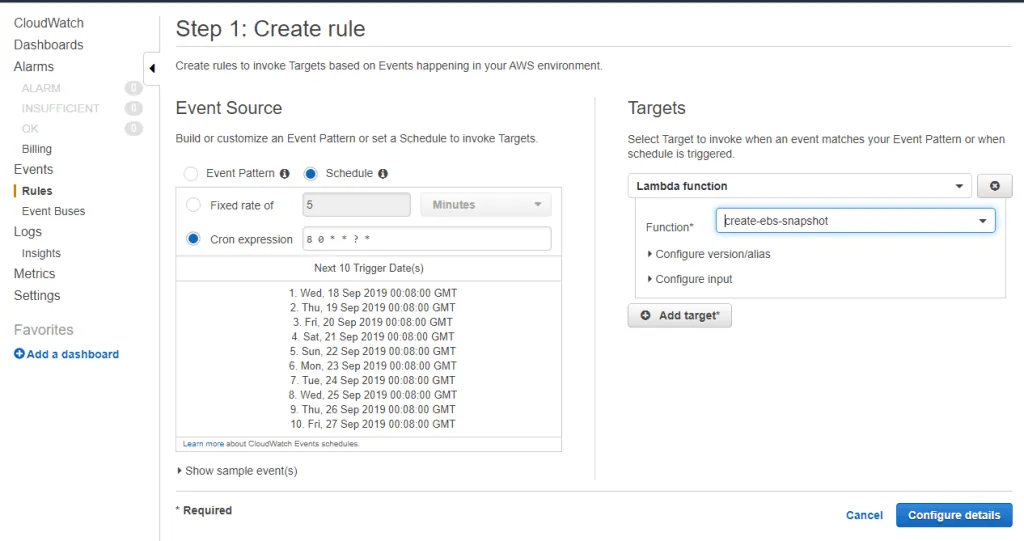
The settings above create an EC2 snapshot every day at 8:00 am (timezone GMT). You can use a cron expression that fits your needs.
Targets select the Lambda function that the rule runs.
You can also use the Fixed rate option. It creates a snapshot after a fixed number of minutes, hours or days.
- Go back to the Lambda Management Console.
- Select the function you just created. Its page opens.
- Click on the Add trigger button in the Designer section.
- Select CloudWatch Events as the trigger.
- Choose the new CloudWatch rule from the existing rules and click on Add.
- The Lambda function that creates a snapshot for the EC2 instance is now complete. You can test it by clicking the Test button.
Lambda Function to Delete a Snapshot
You must manage both the create and the delete function. We create many snapshots, depending on our needs. If we do not delete them, they pile up and we must delete them by hand.
Follow the steps below to automate the delete function.
- Click on Create function new page will open.
- Select Author from Scratch.
- Give a specific name for creating a lambda function in the Function name.
- Choose Python 3.6 as a runtime.
- For roles select Use an existing role and select the role we made earlier.
Code to Delete Snapshots in EC2 Snapshot Management
import boto3
import re
import datetime
from datetime import timedelta
# Set the global variables
globalVars  = {}
globalVars['RetentionDays'] = "15"
ec = boto3.client('ec2')
iam = boto3.client('iam')
def lambda_handler(event, context):
    account_ids = list()
    try:
        """
        You can replace this try/except by filling in `account_ids` yourself.
        Get your account ID with:
        > import boto3
        > iam = boto3.client('iam')
        > print iam.get_user()['User']['Arn'].split(':')[4]
        """
        iam.get_user()
    except Exception as e:
        # use the exception message to get the account ID the function executes under
        account_ids.append(re.search(r'(arn:aws:sts::)([0-9]+)', str(e)).groups()[1])
    retention_days = ( datetime.date.today() - datetime.timedelta(days= int(globalVars['RetentionDays'])) ).strftime('%Y-%m-%d')
    delete_on = datetime.date.today().strftime('%Y-%m-%d')
    filters = [
        {'Name': 'tag-key', 'Values': ['automatic-snapshot-delete-on']},
        {'Name': 'tag-value', 'Values': [delete_on]},
    ]
    snapshot_response = ec.describe_snapshots(OwnerIds=account_ids, Filters=filters)
    print("snapshot_response {0}".format(snapshot_response))
    all_snap = ec.describe_snapshots(OwnerIds=account_ids)
    for snap in all_snap['Snapshots']:
        snapshot_time = snap['StartTime'].strftime('%Y-%m-%d')
        if snapshot_time <= retention_days:
            snapshot_response['Snapshots'].append(snap)
    for snap in snapshot_response['Snapshots']:
        print("Deleting snapshot {0}".format(snap['SnapshotId']))
        ec.delete_snapshot(SnapshotId=snap['SnapshotId'])
Every time the function above runs, it performs the following steps:
- Delete the snapshot according to the tag of the EC2 instance. Otherwise, it uses the default retention_days value “15”. It deletes all the snapshots older than 15 days.
- Also, change the Basic Settings for the Lambda function. The default timeout is 3 seconds, so we increase it (I used 59 sec). Otherwise, the delete function times out before it deletes the snapshots correctly.
CloudWatch Rule to Delete Snapshots
Now that we have the Lambda function, we can also use a CloudWatch rule to automate the delete function.
- Go to the CloudWatch Management Console from Services.
- On the CloudWatch page, move to Rules in the left panel.
- Click on Create rule. A new page opens.
- Use the settings below to create a rule.
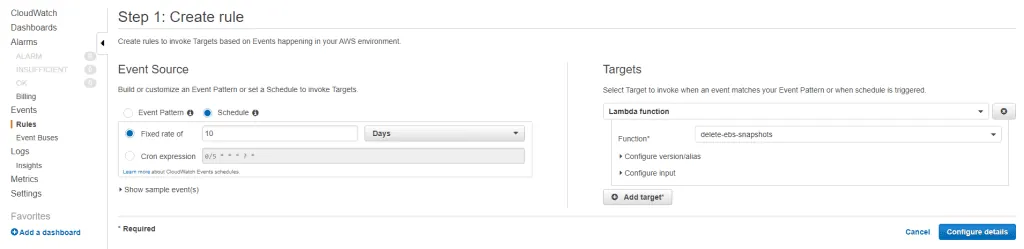
The settings above delete an EC2 snapshot that is older than 10 days.
- Go back to the Lambda Management Console.
- Select the delete function you just created. Its page opens.
- Click on the Add trigger button in the Designer section.
- Select CloudWatch Events as the trigger.
- Choose the new CloudWatch rule from the existing rules and click on Add.
The Lambda function that deletes a snapshot for the EC2 instance is now complete. Your EC2 snapshot management is now automatic.
Need help with your infrastructure?
We build and run custom systems on AWS, Azure and Docker.