
Triggers are a vital part of Salesforce. They become active if any change occurs in code. But before we move to them, let’s first talk about Salesforce. Then we will discuss why Salesforce triggers matter. You can also read about the platform on the official Salesforce site.
A Little Glance Over Salesforce
So since it was first released more than two decades ago, Salesforce has dominated the commercial CRM market. It has helped companies simplify their business processes. It also brings automation and efficiency to client database management. Salesforce CRM provides a variety of services, such as lead management, email marketing, advertising, and useful integrations.
A Salesforce development company offers services that suit the client’s demands. It hires several developers to look after all aspects of the platform. To understand how Salesforce CRM handles data, you first need to review the notion of Apex. Salesforce triggers are among the most important parts of Salesforce. For help with a custom build, see our custom software services.
Various Operations Performed By Salesforce Triggers
Salesforce triggers are the components that allow Salesforce developers to perform specific and customized actions before or after changes are made to Salesforce records. These modifications could include data updates, deletions, or additions to the system.
In Salesforce, a trigger is essentially an Apex script that developers utilize before or after data modification events (DML). Here are some of the most common operations in Salesforce that a trigger can perform:
- Inserting data into the system
- Updating data within the system
- Deleting data from the system
- Merging data across platforms
- Upsetting data into the system
- Undeleting data from the system
For example, developers can run a trigger before or after records are restored from the Recycle Bin. Objects that correspond to the top-level standards can have triggers defined. These are the objects in a database that support triggers, like Contacts and Accounts. Triggers can also be set for standard child items like Case Comment and other custom objects.
In Salesforce, you may establish triggers by going to the “Item Management Settings” section and selecting “Triggers” for the object whose triggers you want to access.
Developers can use two different sorts of Salesforce triggers
Before Salesforce Triggers:
These are the triggers that are used to update Or validate required record values before saving them to the platform database.
After Salesforce Triggers:
These are read-only triggers that allow Developers to access the system’s field values and impact changes in separate records (such as firing asynchronous events using a queue or logging into an audit table).
Syntax of a Salesforce Trigger:
Trigger TriggerName on ObjectName (trigger_events)
{
Code_block
}
What Are Trigger Context Variables and How Do They Work?
Trigger Context Variables are the system’s definite variables that developers use to get access to the run-time context. Here are some of the major variables in Salesforce and their uses:
- isExecuting – It returns true if the current context of the Apex code is a defined trigger rather than a Visualforce page, an executeanonymous() API request, or a web service.
- isInsert – This variable returns true when an insert operation fires the trigger.
- isUpdate – An update action makes it return true.
- isDelete – The variable returns true when a delete operation fires the trigger.
- isBefore – This variable returns true when a trigger fires before the system saves any records.
- isAfter – Likewise, it returns true when a trigger fires after the system saves all the entries.
- isUndelete – It returns true when a user recovers a record from the recycle bin.
- new – This variable returns a list of new versions of the records that contain Salesforce objects.
Collection Variables in Salesforce Triggers
- newMap – This is the variable that functions as a map between all relevant Ids and newer versions of Salesforce object records. This variable is only available in the triggers before update, after update, after insert, and after undelete.
- old — This variable returns a collection of Salesforce object records in their previous versions. Only delete and update triggers have access to this variable.
- oldMap – This variable is a map of all relevant Ids of older records that contain Salesforce objects. Only delete and update triggers have access to this variable.
- size – When trigger fires, this variable displays the total number of records (old and new).
Actions Performed By Trigger Events
Salesforce trigger events to do certain data manipulation language actions. These are some of the important acts that those trigger events perform:
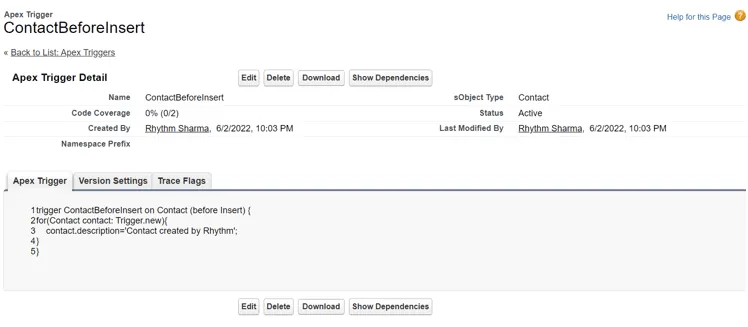
- beforeinsert – Using the trigger platform, this event executes the activity of modifying fields. New.
Salesforce Triggers Example: beforeinsert
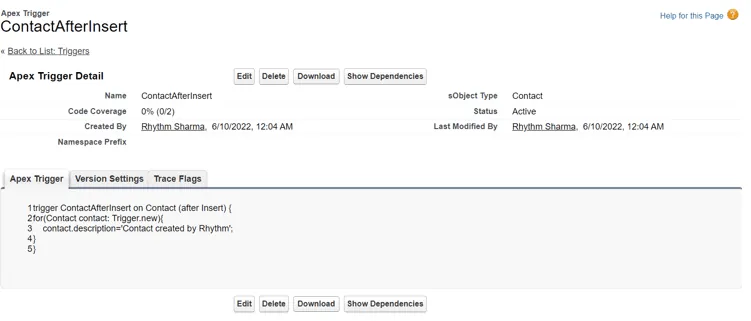
- afterinsert – Using a “update DML” action, this event can be used to update an original Salesforce object.
Example: afterinsert
- beforeupdate – When using trigger.new to change fields you can use this event.
Salesforce Triggers Example: beforeupdate

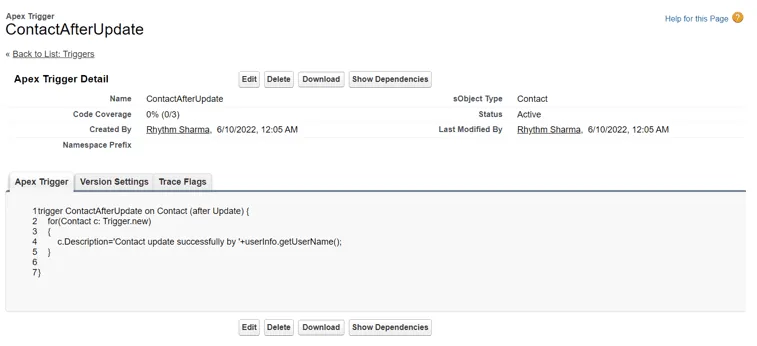
- afterupdate – Using a “update DML” method, this event can update an original object. With the help of a “delete DML” action, it can also erase an original object.
Example: afterupdate
- beforedelete – This event can only use an “update DML” procedure to update an original object.
Example: beforedelete

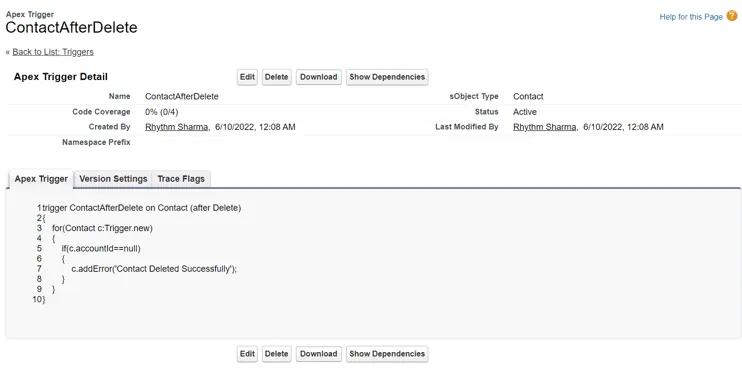
- afterdelete – As a trigger, this trigger is unable to do the majority of the activities. The after delete triggers do not support new. It also can’t be used to update items because they’ve previously been destroyed.
Example: afterdelete
Triggers are vital for Salesforce Developers since they assist them in managing sensitive customer data within the system, specifically consistent with the requirements of the client organizations. However, developers should exercise caution when performing triggers, as even the tiniest error may need disastrous consequences.
How to Write Test Class in Salesforce Triggers?
Before understanding how to construct test classes, it’s important to understand what a test class is and why we develop them, so let’s talk about that.
What is Test class?
The Software Development Life Cycle includes testing as an important component (SDLC). Salesforce verifies that your code has a minimum of 75% code coverage before putting it into production. This indicates that your code has been thoroughly tested and will not fail in a production setting. You must create a Test class for each of your classes in order to accomplish this. Apex testing framework makes writing test classes for Apex classes and triggers much easier.
Why we write Test classes?
We create a test class to confirm that Apex Classes and Triggers are functioning properly by testing single and bulk record processing, as well as positive and negative test cases. You must also establish the testing database for this.
Apex Test Class Best Practices
Here are some key points you should have knowledge about it before creating a Trigger.
- Only Salesforce will regard this class as a test class if you begin it with the @isTest annotation.
- Keep your class private and also, the best approach is to call your test class the same as your main one or trigger Name + ‘Test’.
- Your test class’s methods must be static, void, and use the testMethod keyword.
Test Data and Governor Limits
- Prepare your test data, which must exist before the beginning of your actual tests. Nowadays, there are a range of methods for creating test data, like the setup method, static resources, and so on. Take a look at the link below for further information on the @testSetup function within the apex test class.
- To make sure that actual testing of your code occurs with a fresh set of governer restrictions, use Test.startTest() and Test.stopTest(). These methods assist you in resetting your governor limitations immediately prior to executing your actual testing code.
- After your test code has run between Test.startTest() and Test.stopTest(), you need to use assert statements to work out if your code is indeed running correctly and producing the required results. In our situation, we’re checking to determine if the book’s price is set to 90 or not. If this assert statement returns false, your test class will fail, alerting you to the vary the fact that something in your code isn’t quite right, and you may have to return and alter it.
Trigger Example
Apex Trigger
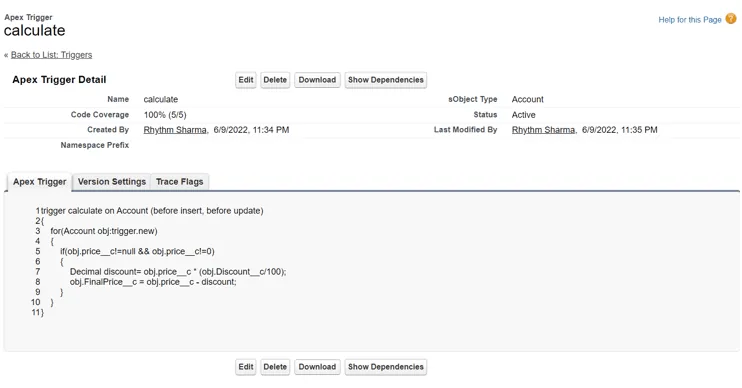
Here we create a trigger named calculate on Account object. This trigger will fire before insert and before update the record.
Test class for Trigger
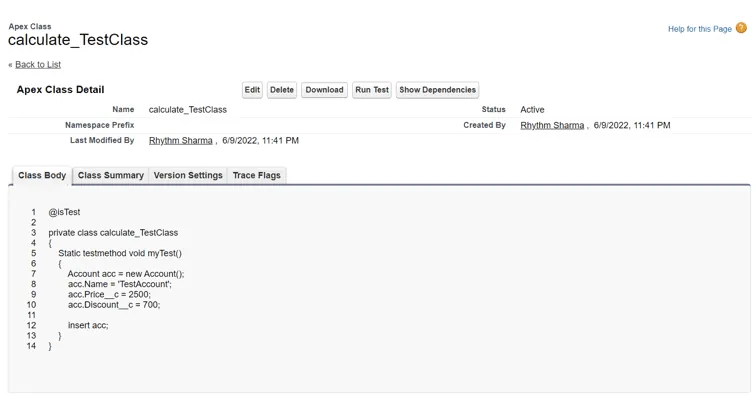
Advantages of Test Class
- To determine whether the context of the class is Test or not, use Test.isRunningTest() in your code.
- Enables test classes to highlight inside the Code block, use this condition with the OR (||) operator.
- To identify private members and methods within Test Class, use the @TestVisible annotation.
Triggers are a critical component of any Salesforce project and one of the most important ideas in Apex. They enable you to do a variety of activities. For example, they help automate processes. They also improve data management and solve difficult scenarios that a workflow or process builder could not address. To achieve the finest outcomes, you should of course follow the best practices.
Have a question about this?
Book a 30-minute call with an engineer who works on it.